Behaviour · Measured 2026-10-20, iPhone 16 Pro, iOS 18.6.2 (22G100) · S, Screenshot or recording · Agrees with BCD
When a page declares both an apple-touch-icon and manifest icons, only manifest icons, or neither, which image does iOS 18.6.2 put on the Home Screen?
On an iPhone 16 Pro running iOS 18.6.2 (22G100), iOS chose the 180 px apple-touch-icon, then the manifest any 192 px icon when that link was absent. Pages with neither got letter tiles in the 2026-10-20 test.
The test icons are labelled with their source, so a Home Screen screenshot identifies the file iOS chose. The 180 px apple-touch-icon is red and labelled “180 apple-touch”, the manifest any 192 px icon is blue and labelled “192 manifest any”, and the 512 px and maskable icons carry their own labels. Four pages were added from Safari:
| Home Screen item |
Page |
Declared icons |
| PWA Lab |
/lab/device-tests/ |
apple-touch-icon 180; manifest any 192 and 512, maskable 192 and 512; a 96 px favicon |
| Lab no-ATI |
/lab/device-tests/t3/manifest-only/ |
manifest any 192 and 512, maskable 192 and 512; a 96 px favicon; no apple-touch-icon |
| T1 probe |
/lab/device-tests/t1/no-manifest/ |
none |
| iOSAddtoHom… |
/reference/installation/ios-add-to-home-screen/ (added earlier the same day) |
an SVG favicon (/favicon.svg) only; no manifest, no apple-touch-icon |
The record is visual: the operator’s description at install time (O, N11, N12, N52) and the Home Screen as captured in later screenshots and in the first frame of the screen recording (S, N63). The demo app and two later apps (SBS transl, Perm Test) appear in the same images. A page cannot see which icon iOS chose, so this topic has no instrumented read.
- In Safari, open
https://openpwa.net/lab/device-tests/ and add it to the Home Screen (Share → Add to Home Screen → Add).
- Open
https://openpwa.net/lab/device-tests/t3/manifest-only/ and add it the same way.
- Open
https://openpwa.net/lab/device-tests/t1/no-manifest/ and add it.
- Go to the Home Screen and take a screenshot that shows the three new icons. Crop other apps before sharing it.
- Read each icon’s label: “180 apple-touch” means the
apple-touch-icon was used, “192 manifest any” the manifest any icon; a 512 or maskable label, a favicon, a page screenshot or a plain letter tile are the other outcomes.
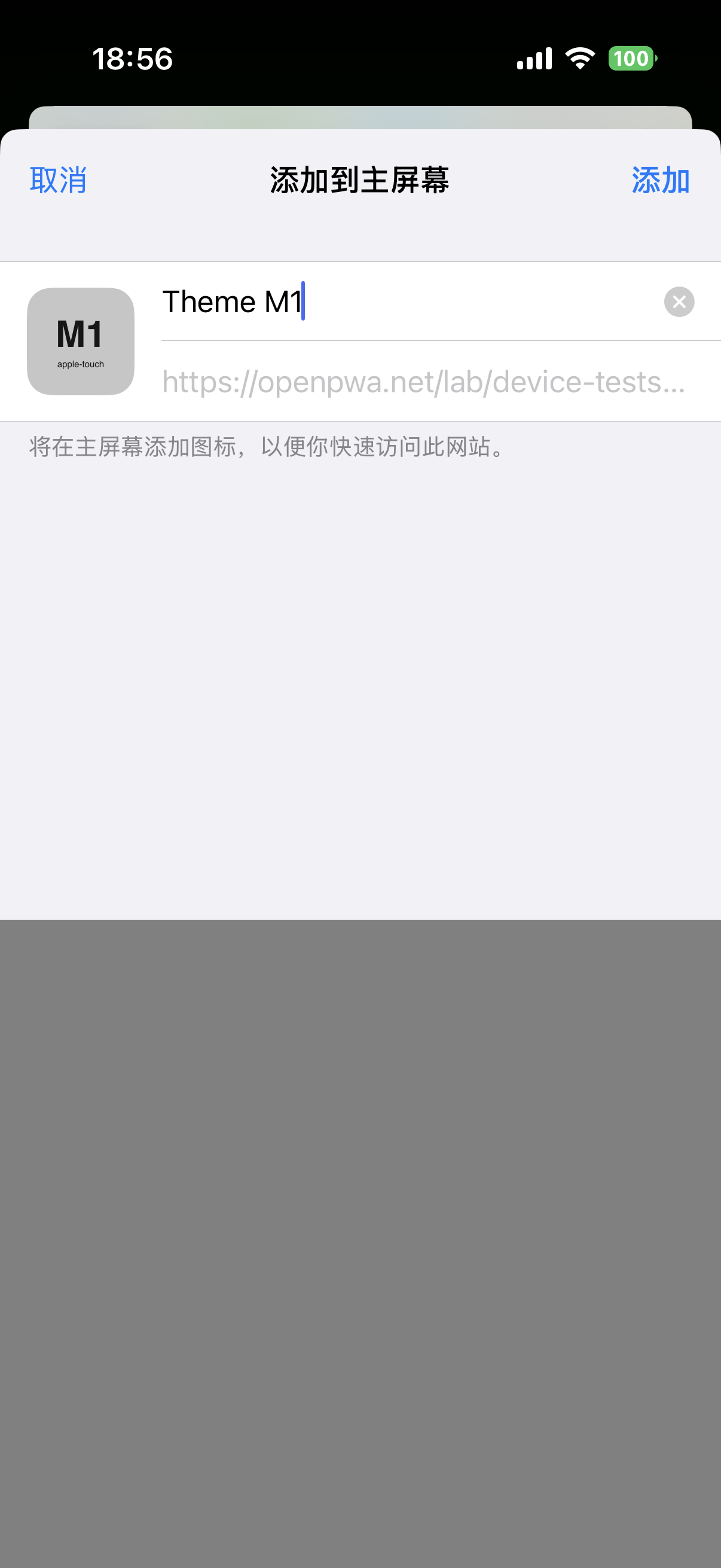
- Optional: before tapping Add in step 1, take a screenshot of the sheet, which shows an icon tile before the app is added. For the M1 status-bar app that tile was the
apple-touch-icon (N66); whether the two icons match in other cases was not checked.
Name screenshots <YYYY-MM-DD>_<device-slug>_<os-version>_<test-id>_<n>.png, for example 2026-10-20_iphone16pro_ios18.6.2_T3_1.png.
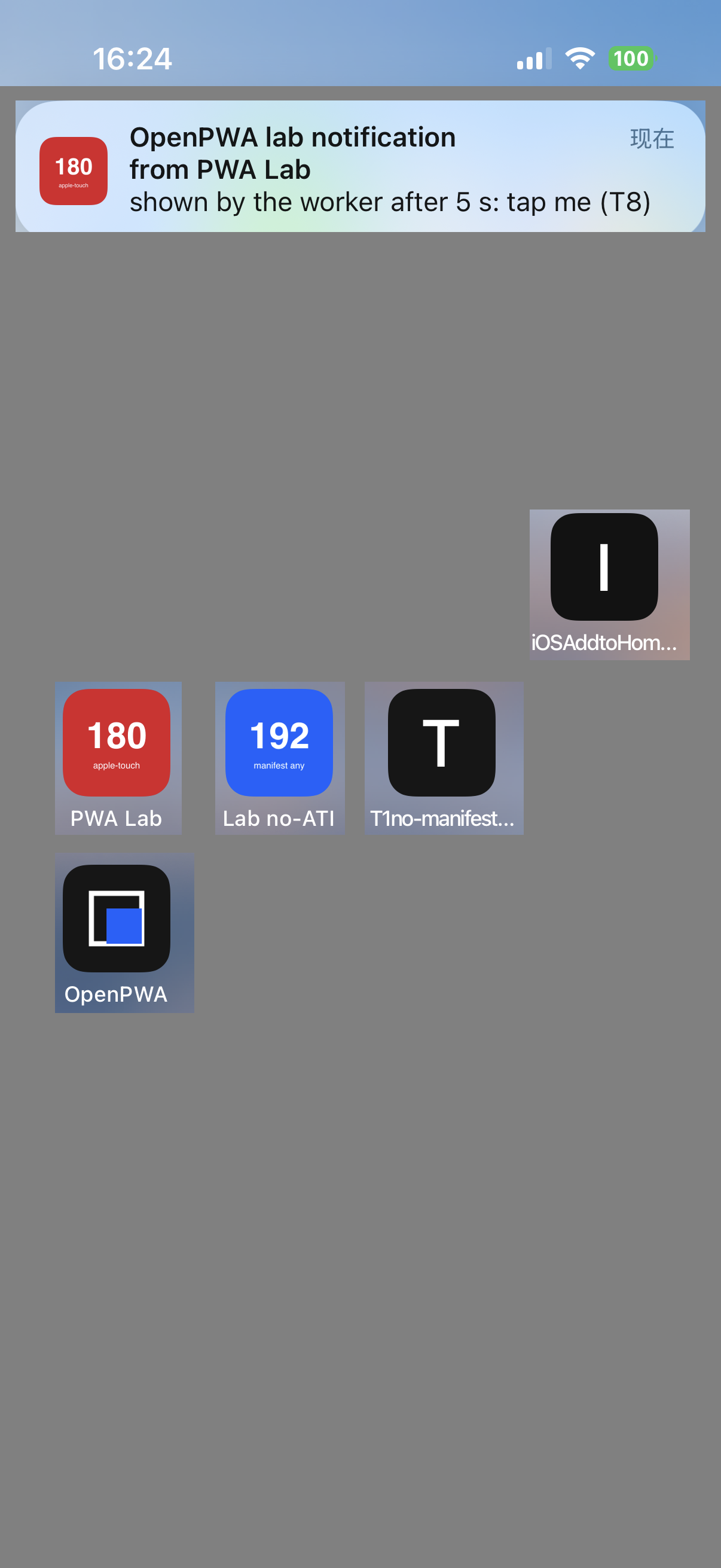
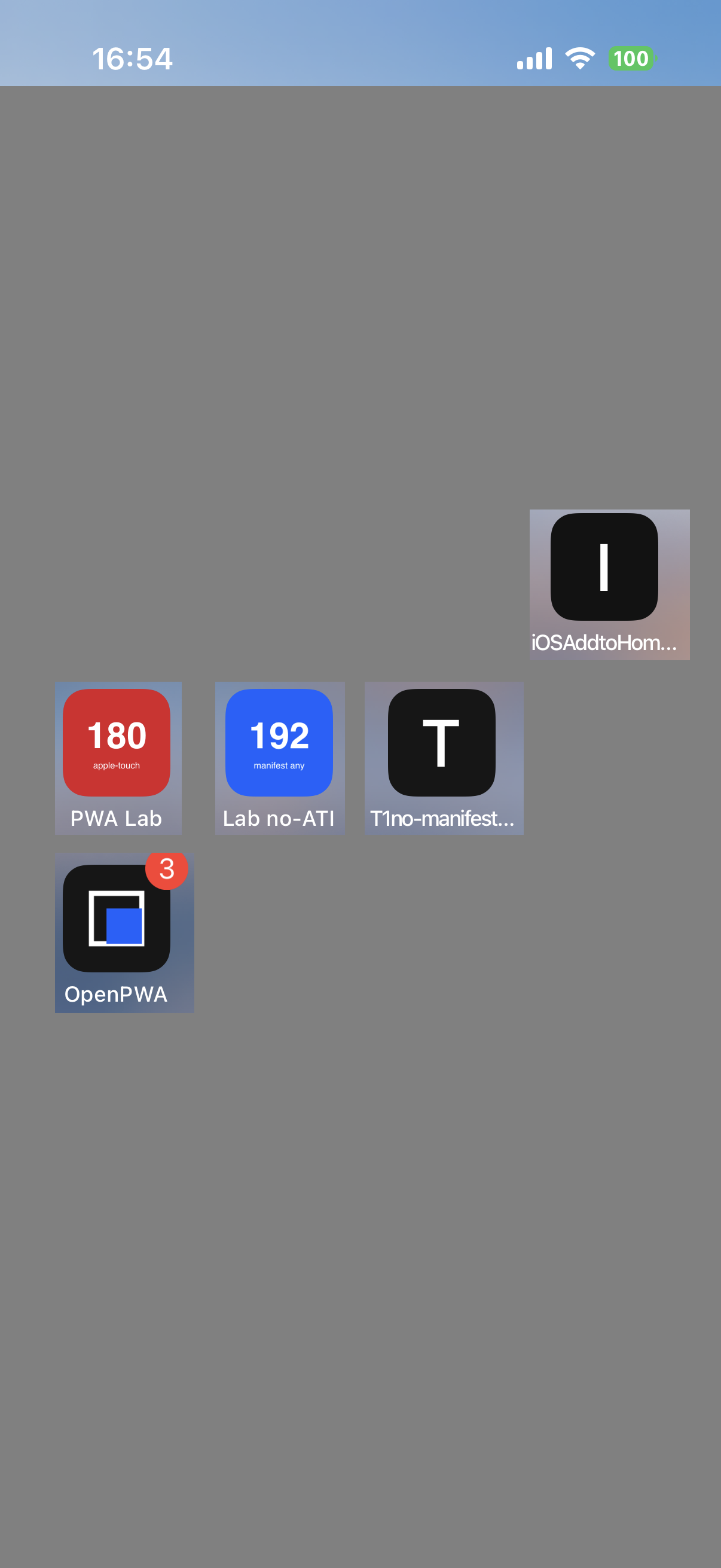
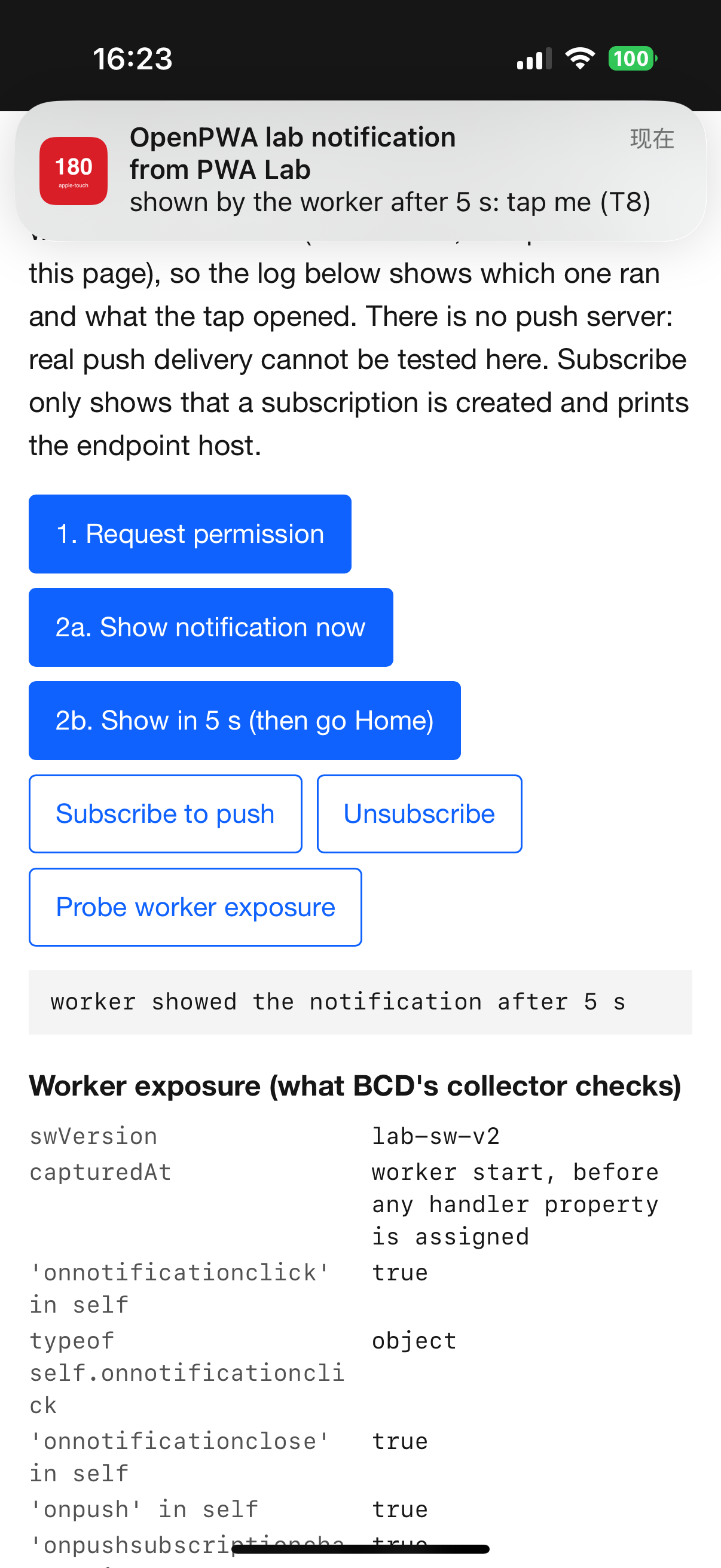
On iOS 18.6.2 PWA Lab showed the red “180 apple-touch” icon, not any of its manifest icons. Lab no-ATI showed the blue “192 manifest any” icon, not its 512 px or maskable icons. The T1 probe got a black letter tile “T” (label “T1no-manifest…”) and the reference page a black letter tile “I” (label “iOSAddtoHom…”). SBS transl, which links the lab’s 180 px icon, showed it too, and Perm Test showed its own yellow “P7” (S, N63; the operator’s descriptions agree, O, N11, N52). The notification banners from PWA Lab carried the 180 px icon (S, screenshot T8_1a). The add sheet captured for the M1 status-bar app showed that app’s apple-touch-icon as the tile, not its manifest icons (S, N66). The confidence label is S.
2026-10-20, iOS 18.6.2
On the Home Screen screenshots the PWA Lab icon is the 180 px apple-touch-icon although its manifest also lists icons; the manifest-only app shows the manifest any 192 icon; pages with no icon get a black letter tile.
- Date
- 2026-10-20
- Device
- iPhone 16 Pro
- OS and build
- iOS 18.6.2 (22G100), release
- Context
- Home Screen app
- Result
- As expected
- Key values
appleTouchIconAndManifest: 180 apple-touch-iconmanifestIconsOnly: 192 manifest anynoIcon: letter tile
- Confidence
- S, Screenshot or recording
- Tests
- T3
- Notebook entries
- N63
- Study
- Read the study · Data package
- Harness
- Harness v1
Harness v1 files used (7), served SHA-256
/lab/device-tests/ 42c90845419f5ed3ad15d941bea04f649f4c5d350b1847292292fadd55871486/lab/device-tests/manifest.webmanifest cab4e60719fd1f9c84d04aada2ad6cd937f50615ce646c3ed20f14f0ca09832b/lab/device-tests/t3/manifest-only/ 1fe7e2a1d4aeb86fdf69b0f4546e28237dab65c53f2dc29a72148b99f1ec3920/lab/device-tests/t3/manifest-only/manifest.webmanifest b036cb4f6aca01703f5e4ad9ae009d623d8072378c7db3ebeb3132746d3e4f15/lab/device-tests/icons/ati-180.png 08d9c8fa268662b4c67f5d96ffa1fa508cfd2c3f3048e550f498c02dca82e8ef/lab/device-tests/icons/any-192.png 2686e14cf8b1123fd4fbf9ea277c49733f2972dcc5f1954ee50ec8c05fadc6cf/lab/device-tests/t1/no-manifest/ 79d08968039e334ea4f980b369714a32b459d054b93d68a562bd5610ac75eb3a
The demo app showed its own artwork, a dark square with a blue inner square (S, N63; O, N12). The demo uses the same artwork for all its declared icons, so the demo cannot tell which file was used; the labelled lab icons answer that question.
Apple’s archived guide documents only the apple-touch-icon link: with several sizes, “The icon that is the most appropriate size for the device is used”, and when no link element is present the site root is searched for apple-touch-icon…png files (Configuring Web Applications, developer.apple.com). It predates manifest icons and says nothing about what is shown when no icon is found.
BCD records manifest icons for Safari on iOS from 15.4, with the note “Only used when no apple-touch-icon is present and either "purpose" is set to "any" or "purpose" is not specified” (BCD manifests/webapp/icons.json, github.com, read 2026-10-20). Firtman’s notes say the apple-touch-icon link “overrides the manifest icon declaration” and that WebKit recognises maskable icons but ignores them (iOS PWA Compatibility, firt.dev).
The icon order agrees with BCD and Firtman (apple-touch-icon first, then a manifest any icon, maskable ignored). The letter tile for pages with no apple-touch-icon and no manifest icon, including one with only an SVG favicon, is observed here and not described by these sources.
From the iOS 18.6.2 data package (CC BY 4.0):
Other apps on the Home Screen are blanked in the archived copies. Notebook entries N11, N12, N52, N63 and N66: 2026-10-ios18-baseline.md. Rows: /lab/results.json. Cite as “OpenPWA device test, 2026-10-20, iPhone 16 Pro, iOS 18.6.2 (22G100), N63”.
The result supports the icon-precedence statements in the icons manifest member and iOS Add to Home Screen entries.
Reference entries
Compatibility data
- Screenshot evidence only (S). The icon choice is not readable from the page, so no instrumented read exists.
- The Home Screen screenshot planned for the install step (T3_1) was not delivered; later screenshots cover the same icons.
- One
apple-touch-icon size (180 px) was declared. Pages with several apple-touch-icon sizes, SVG icons and icons that fail to load were not tested.
- The letter tiles were black on this run. The rule that sets a tile’s letter and colour was not characterised.
- The add sheets for the lab pages themselves were not captured; only the M1 sheet was (N66).
- One iPhone 16 Pro, one build, one operator; iOS 26 and later were not tested here.
Device steps performed by an OpenPWA operator on an iPhone 16 Pro. AI agent sessions read page state over USB, kept the notebook and drafted this text; automated gates and an AI fact-check checked it. No person reviews each entry.