When a Home Screen web app with the default status-bar style shows a page whose <meta name="theme-color"> differs from the manifest’s theme_color, or declares only one of the two, which colour does the strip behind the time, signal and battery take on iOS 18.6.2?
The status-bar strip took the page’s theme-color meta; without it, the strip used the manifest’s theme_color. The screenshots came from an iPhone 16 Pro running iOS 18.6.2 (22G100) on 2026-10-20.
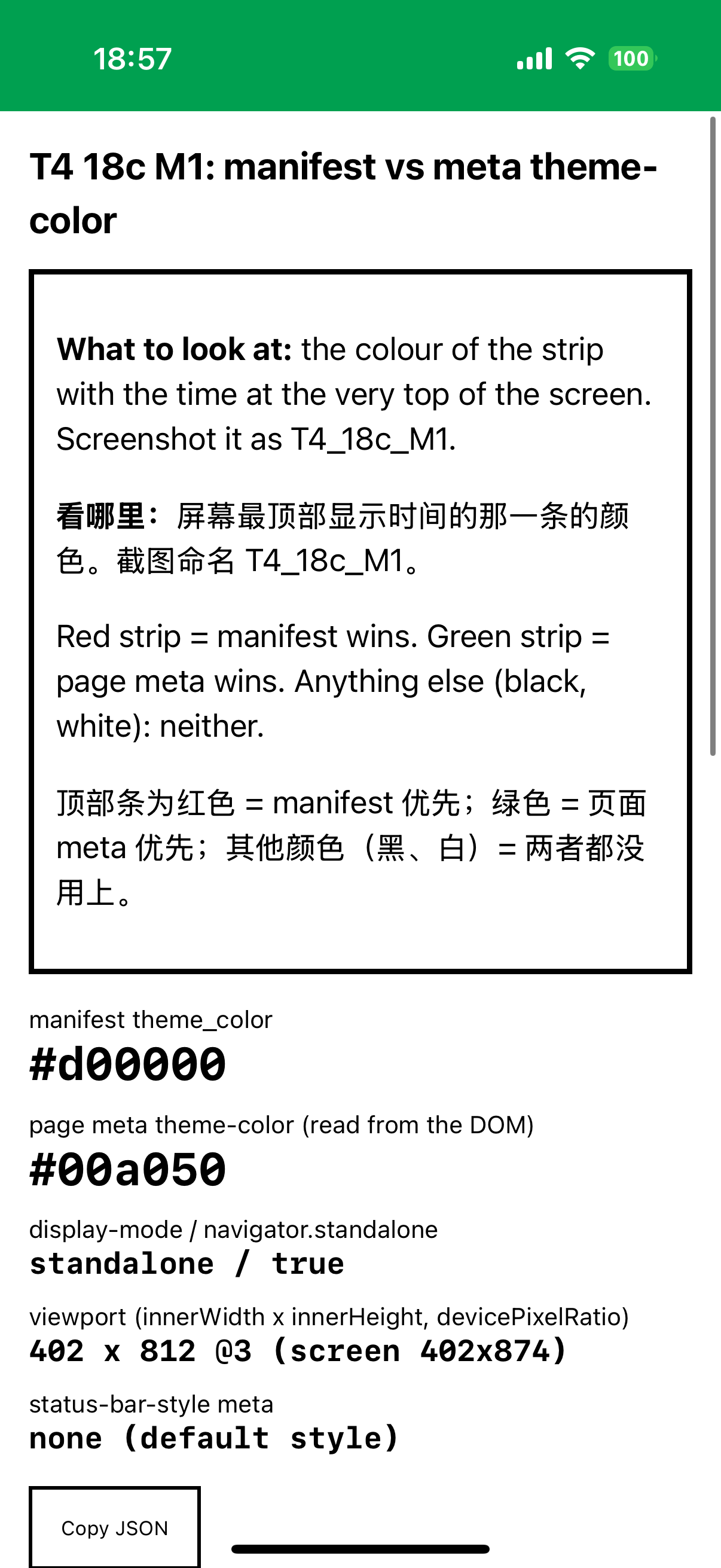
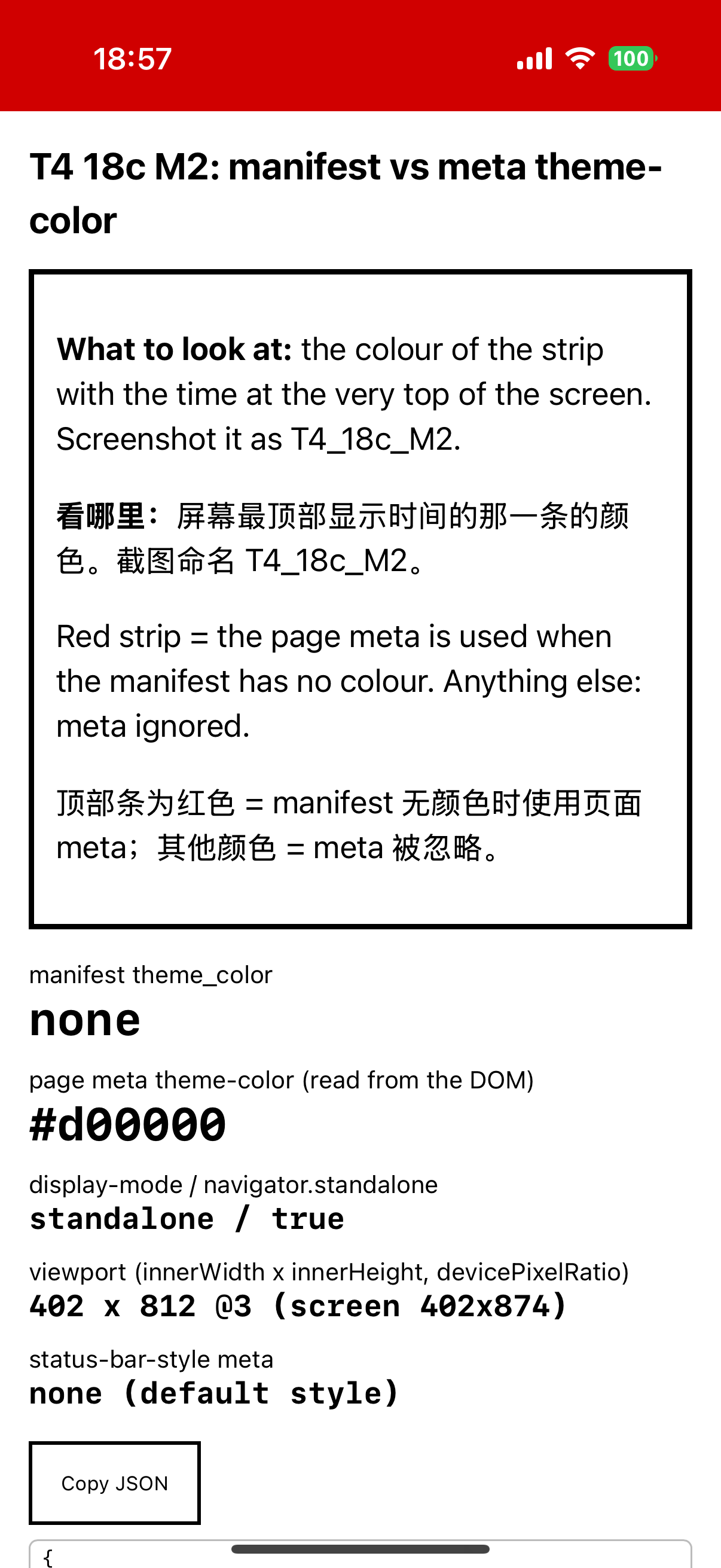
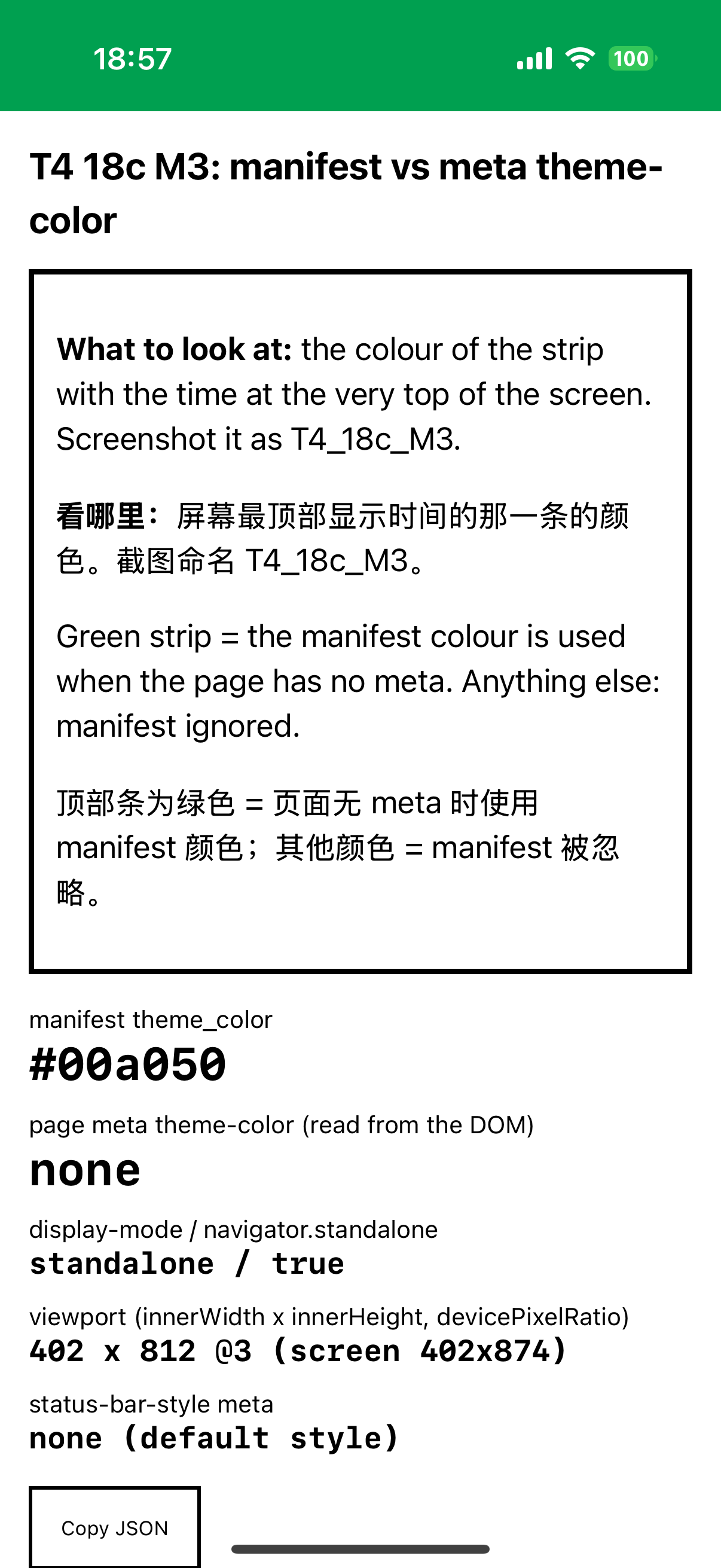
The main run could not separate the two sources: every lab and demo manifest declares theme_color#161616, and every screenshotted in-app page also had a theme-color meta of #161616. A follow-up the same evening (step 18c) installed three separate apps, each with its own manifest and scope, a white page with no header, the default status-bar style (no apple-mobile-web-app-status-bar-style meta) and no viewport-fit=cover:
App
URL
manifest theme_color
page theme-color meta
M1
/lab/device-tests/t4/theme-m1/
#d00000 (red)
#00a050 (green)
M2
/lab/device-tests/t4/theme-m2/
none
#d00000 (red)
M3
/lab/device-tests/t4/theme-m3/
#00a050 (green)
none
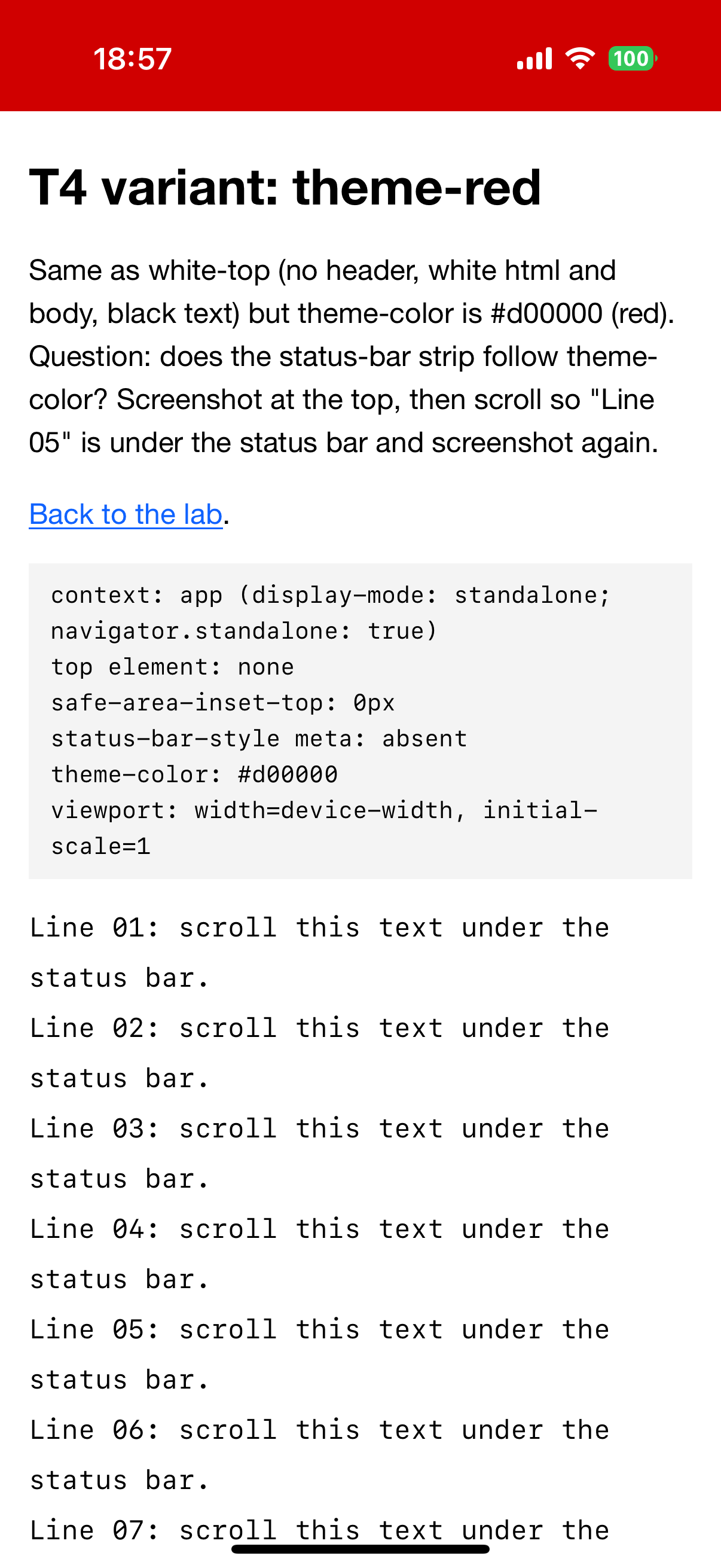
A fourth case, the theme-red page opened inside the existing PWA Lab app, has a meta of #d00000 while the lab manifest says #161616. The reading of each outcome (for example “M1 red means the manifest wins”) was written into the tap list before the screenshots were taken.
We used screenshots to determine the colour. An agent sampled six pixels inside the strip of each image, at (30, 20), (400, 30), (600, 100), (1150, 170), (30, 170) and (600, 180) of the 1206 x 2622 screenshot, clear of the time and battery glyphs; on this iPhone the strip ends at y 186 (N64). The operator also named the colour of each strip. No instrumented read was taken of M1 to M3. From the main run the geometry of default-style pages is instrumented (inner height 812 of 874, safe-area-inset-top 0, N25 to N29) and 17 portrait screenshots were sampled the same way (N62).
In Safari, open https://openpwa.net/lab/device-tests/t4/theme-m1/, tap Share → Add to Home Screen → Add. Repeat for …/t4/theme-m2/ and …/t4/theme-m3/. Each becomes its own app with a grey “M1”, “M2” or “M3” icon.
Keep the phone in Light appearance (Settings → Display & Brightness) and portrait.
Open each app from its icon and take a screenshot with the strip visible. Each page prints its own manifest colour, its meta colour and standalone / true.
Optional: open the PWA Lab app (https://openpwa.net/lab/device-tests/ added to the Home Screen), go to the T4 table, open theme-red inside the app and take a screenshot.
Name the colour of each strip, then check it in an image editor by sampling a few pixels inside the strip, away from the time and battery glyphs.
Read the outcome: M1 green means the meta wins over the manifest; M2 red means the meta is used without a manifest colour; M3 green means the manifest colour is the fallback.
Name screenshots <YYYY-MM-DD>_<device-slug>_<os-version>_<test-id>_<n>.png, for example 2026-10-20_iphone16pro_ios18.6.2_T4_18c_M1.png.
On iOS 18.6.2 the strip took the page’s theme-color meta whenever the page had one, also when it differed from the manifest, and fell back to the manifest’s theme_color when the page had none. All six sample points were identical in each image: M1 #00a050 (meta, over the manifest’s #d00000), M2 #d00000, M3 #00a050, and theme-red inside PWA Lab #d00000 over the lab manifest’s #161616 (S, N64, N65; the operator’s colour names agree on all four, O). The theme-red case shows that the colour follows the page on screen; adding the app does not fix its value. In the main run the strip read rgb(22, 22, 22), #161616, in all 17 portrait screenshots of default-style pages, at all six points in 15 of them. In T4_4 the point at (600, 100) fell on the system ringer overlay and read #000000, and in T8_1a the three lower points fell on the notification banner and its shadow. Outside those overlays the strip never read #000000, and nothing blurred or drew page content behind the time (S, N62, with the overlay points re-read from the archived screenshots); page content cannot reach the strip because the viewport starts 62 px below the top (A, N25 to N29). The confidence labels are S for the colour and A for the geometry.
With the default status-bar style the app's viewport starts 62 px below the top (812 of 874 px) and content never reaches the strip, even with viewport-fit=cover, which only adds a 34 px bottom inset; the strip is solid, with no blur. Its colour is the page's theme-color meta when present, over a different manifest theme_color and also inside an existing app, and the manifest theme_color when the page has none (strip pixels in the M1, M2, M3 and theme-red screenshots).
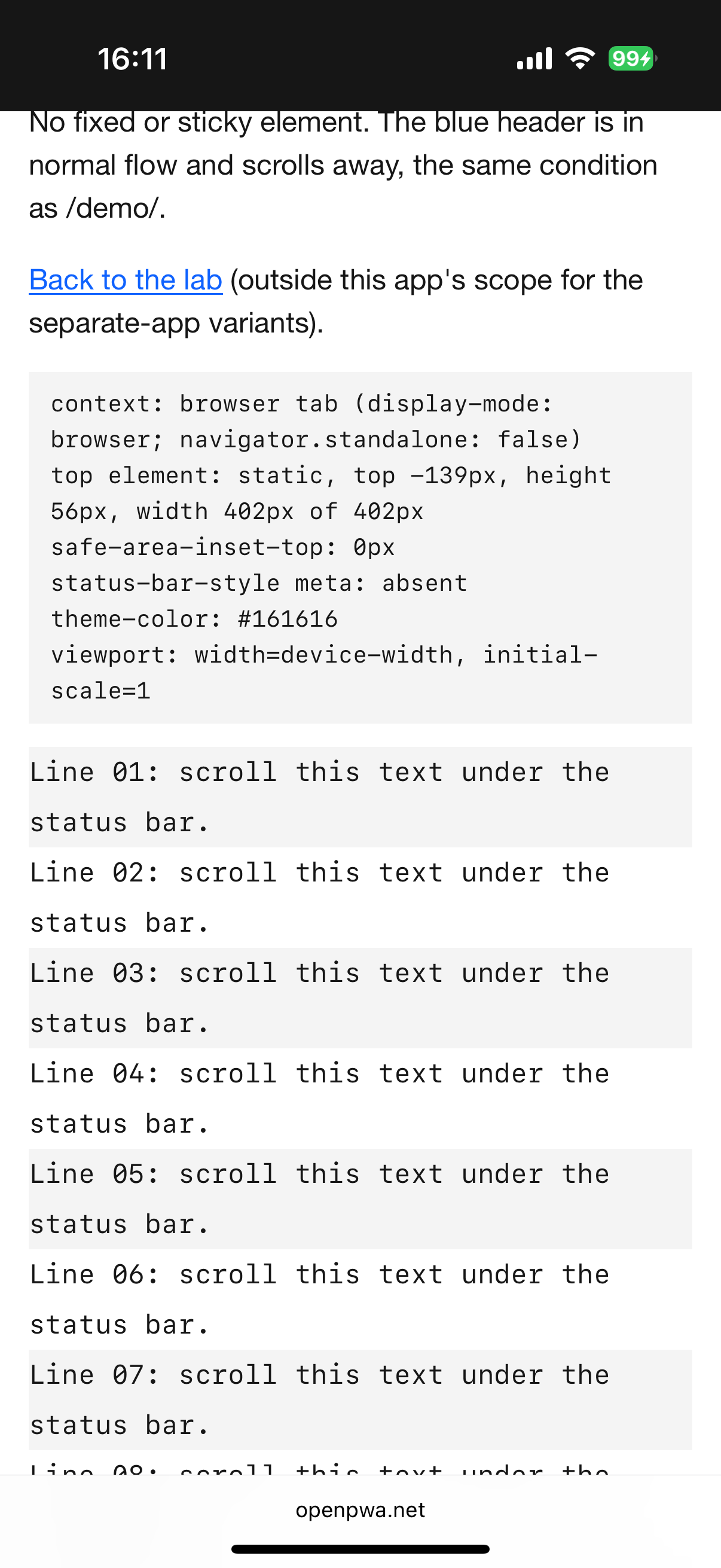
In a Safari tab the strip also showed #161616 when the page’s blue header had scrolled away and the page top was white (S, screenshot T4_5, N62), so the tab tints the status-bar area with the theme-color meta, independently of the content at the top.
The Web Application Manifest makes theme_color the default theme colour of an application context and says the user agent “MAY override the default theme color if a document whose URL is within scope of the application context’s manifest includes a meta element whose name attribute is ‘theme-color’” (Web Application Manifest, theme_color member, w3.org). It permits the override and does not require it. WebKit’s Safari 15 post introduced theme-color “in HTML meta tags, and in Web Manifest” and says it changes “the color of the status bar and overscroll area in Safari on iOS 15” (New WebKit Features in Safari 15, webkit.org); it does not say which wins in an installed app. MDN describes the meta (theme-color, MDN).
BCD lists html.elements.meta.name.theme-color for Safari on iOS from 15, with the note “From Safari 26, the theme color is only used for installed web apps” (BCD html/elements/meta.json, github.com), and manifests.webapp.theme_color from 15 (BCD manifests/webapp/theme_color.json, github.com); both read 2026-10-20. Neither entry states which source takes precedence. Firtman’s notes list theme_color from 15.0 and recommend the theme-color meta over apple-mobile-web-app-status-bar-style (iOS PWA Compatibility, firt.dev).
The result adds a condition to BCD’s support records. Both declarations are supported as BCD says; on iOS 18.6.2, in an installed app, the page’s meta takes precedence and the manifest colour is the fallback, which settles on one build the choice the specification leaves to the browser. The study counts the strip geometry and colour as a measured 18.x baseline confirming documented behaviour, with no claim of novelty. The member is described in theme_color and background_color manifest members.
Main-run screenshots T2_2, T4_2, T4_3a, T4_3b, T4_4, T7_sub_1, T8_1a, T4_reobs_1 to T4_reobs_7 and unassigned_1 in the package’s screenshots/ folder (N62).
Screenshot and operator evidence (S+O) for the colour source; no instrumented read of M1 to M3. The screenshot pipeline’s colour handling was not checked against a measured display.
Not tested: a page that declares neither colour, media-qualified metas (prefers-color-scheme), a meta changed by script after load (the dynamic page has an operator report only), Dark appearance (operator report only, N48), landscape.
The default status-bar style only. black-translucent draws the page under the strip instead, see black-translucent geometry; default and black were not installed.
One iPhone 16 Pro, one build, one operator. Claims about iOS 26 and 27, for example that theme-color “has no effect” there (Modern Web Weekly #80, substack.com), were not tested; this run is their 18.6.2 baseline.
Device steps performed by an OpenPWA operator on an iPhone 16 Pro. AI agent sessions read page state over USB, kept the notebook and drafted this text; automated gates and an AI fact-check checked it. No person reviews each entry.