Behaviour · Measured 2026-10-20, iPhone 16 Pro, iOS 18.6.2 (22G100) · A, Instrumented read · Agrees with WebKit
On iOS 18.6.2, when a page that declares no manifest, no icon, no theme-color and no service worker of its own is added to the Home Screen and opened from its icon, does it open as a separate web app or in Safari, and whose storage and service worker does it see?
The probe opened in Safari and used Safari’s storage and service worker on an iPhone 16 Pro, iOS 18.6.2 (22G100), tested on 2026-10-20.
The probe page /lab/device-tests/t1/no-manifest/ links only a stylesheet. It has no manifest or apple-touch-icon, and neither apple-mobile-web-app-capable meta nor theme-color. It prints navigator.standalone, the result of every display-mode query, whether a service worker controls it, and a one-line summary such as T1 standalone=false dm=browser iOS 18.6.2. The page sits inside the scope /lab/device-tests/ of the lab’s own service worker, which Safari had registered earlier in the run, so a controlling worker on the probe page identifies Safari’s registration set.
We read the page in two contexts:
- In a Safari tab, a WebDriver automation window loaded the page at 07:08:43 UTC (N06). Each WebDriver session on iOS gets its own empty website-data store, so this read gives tab-side display values only, not storage.
- For the Home Screen launch, the operator added the page from Safari, then opened it from its icon; the document’s
timeOrigin is 07:48:59.035Z and the agent’s read started at 07:49:47 UTC (N23). The agent used the WebKit remote inspector over USB to read which process listed the page (Safari’s PID:24364 or the web-app process PID:24500), navigator.standalone, the display-mode queries, innerWidth and innerHeight, the localStorage values, the controlling service worker and getRegistrations(), and the document’s performance.timeOrigin and navigation type.
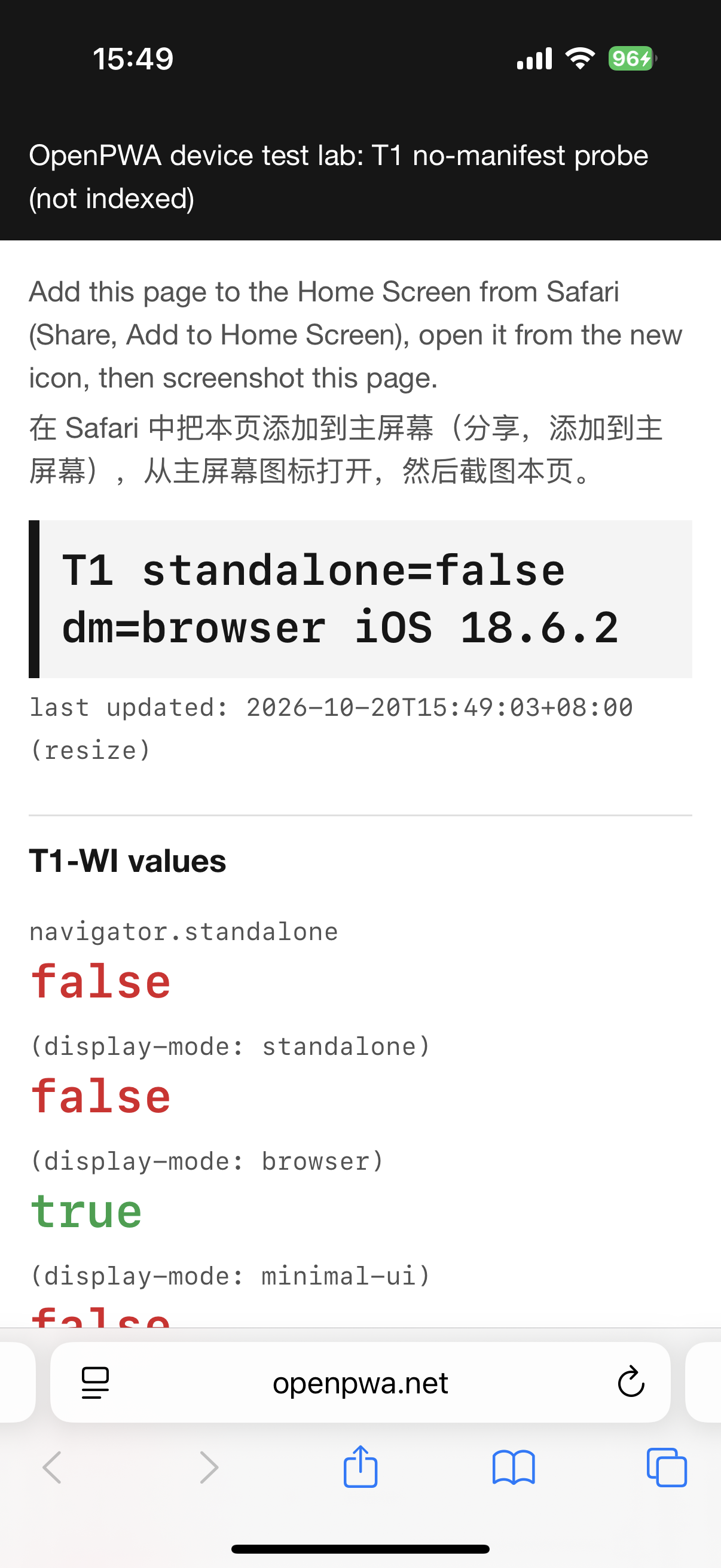
The operator also took a screenshot of the page as it opened (T1_4).
These steps were run on iOS 18.6.2. iOS 26 changed the default (see the documentation section), so on 26 and later the same steps test the “Open as Web App” switch instead.
- Optional, for instrumented reads: on the iPhone turn on Settings → Apps → Safari → Advanced → Web Inspector; on the Mac turn on Safari → Settings → Advanced → “Show features for web developers”, and connect the iPhone by cable.
- In Safari, open
https://openpwa.net/lab/device-tests/#t6 and tap Write marker here. This gives Safari a localStorage value starting TAB- that the probe can be compared with.
- Open
https://openpwa.net/lab/device-tests/t1/no-manifest/ in Safari. The summary line should read standalone=false dm=browser.
- Tap Share, then Add to Home Screen. Take a screenshot of the sheet before tapping Add, and note whether it shows an “Open as Web App” switch.
- Go to the Home Screen and tap the new icon (a letter tile on iOS 18.6.2).
- Note whether Safari’s address bar and toolbar are visible, read the summary line, and take a screenshot.
- With Web Inspector: in Mac Safari open Develop → your iPhone. A page that opened in Safari is listed with Safari’s tabs; a Home Screen web app appears as its own entry. In the console of the probe page run
[navigator.standalone, matchMedia('(display-mode: browser)').matches, innerWidth, innerHeight, localStorage.getItem('openpwa-lab-marker')].
Name screenshots <YYYY-MM-DD>_<device-slug>_<os-version>_<test-id>_<n>.png, for example 2026-10-20_iphone16pro_ios18.6.2_T1_4.png.
- T1 Page with no manifest added to the Home Screen (5 min)
Harness v1: Open the test - T1-WI Display-mode values of the manifest-less icon in Web Inspector (2 min)
Harness v1: Open the test
On iOS 18.6.2 the probe page, opened from its own Home Screen icon, loaded in Safari’s process (PID:24364) with nothing for it in the web-app process, at the Safari tab’s viewport of 402 x 678 CSS px instead of the 402 x 812 of a Home Screen app. navigator.standalone was false and only display-mode: browser matched. The page saw Safari’s localStorage (openpwa-lab-marker TAB-2026-10-20T07:45:25Z, openpwa-demo-lang en), Safari’s two registrations (/demo/ and /lab/device-tests/) and the lab service worker controlling it (A, N23). The screenshot shows Safari’s address bar and toolbar (S, N63). In the automated Safari tab the same page read standalone false, display-mode: browser only and no registrations (A, N06). The confidence label is A+S.
2026-10-20, iOS 18.6.2
A page with no manifest, no icon and no theme-color, added to the Home Screen and opened from its icon, loaded in Safari's process: navigator.standalone false, only display-mode: browser matched, a 402 x 678 viewport, and Safari's localStorage and service worker. The screenshot shows Safari's address bar and toolbar.
- Date
- 2026-10-20
- Device
- iPhone 16 Pro
- OS and build
- iOS 18.6.2 (22G100), release
- Context
- Safari tab and Home Screen app
- Result
- As expected
- Key values
process: SafarinavigatorStandalone: falsedisplayModeMatches: browserinnerWidth: 402innerHeight: 678storage: Safari'sserviceWorker: Safari's lab worker
- Confidence
- A, Instrumented read
- Tests
- T1
- Notebook entries
- N06, N23, N63
- Study
- Read the study · Data package
- Harness
- Harness v1
Harness v1 files used (3), served SHA-256
/lab/device-tests/t1/no-manifest/ 79d08968039e334ea4f980b369714a32b459d054b93d68a562bd5610ac75eb3a/lab/device-tests/t1/no-manifest/probe.js c274df3c9ee717ee0b96125fdf2ea3573984cded34d60036911d2965e5a7979b/lab/device-tests/t1/no-manifest/probe.css 9e53e8b64268c59ffad6d8f627ef6737005d8900f0ab743da276c0c2f3abc09c
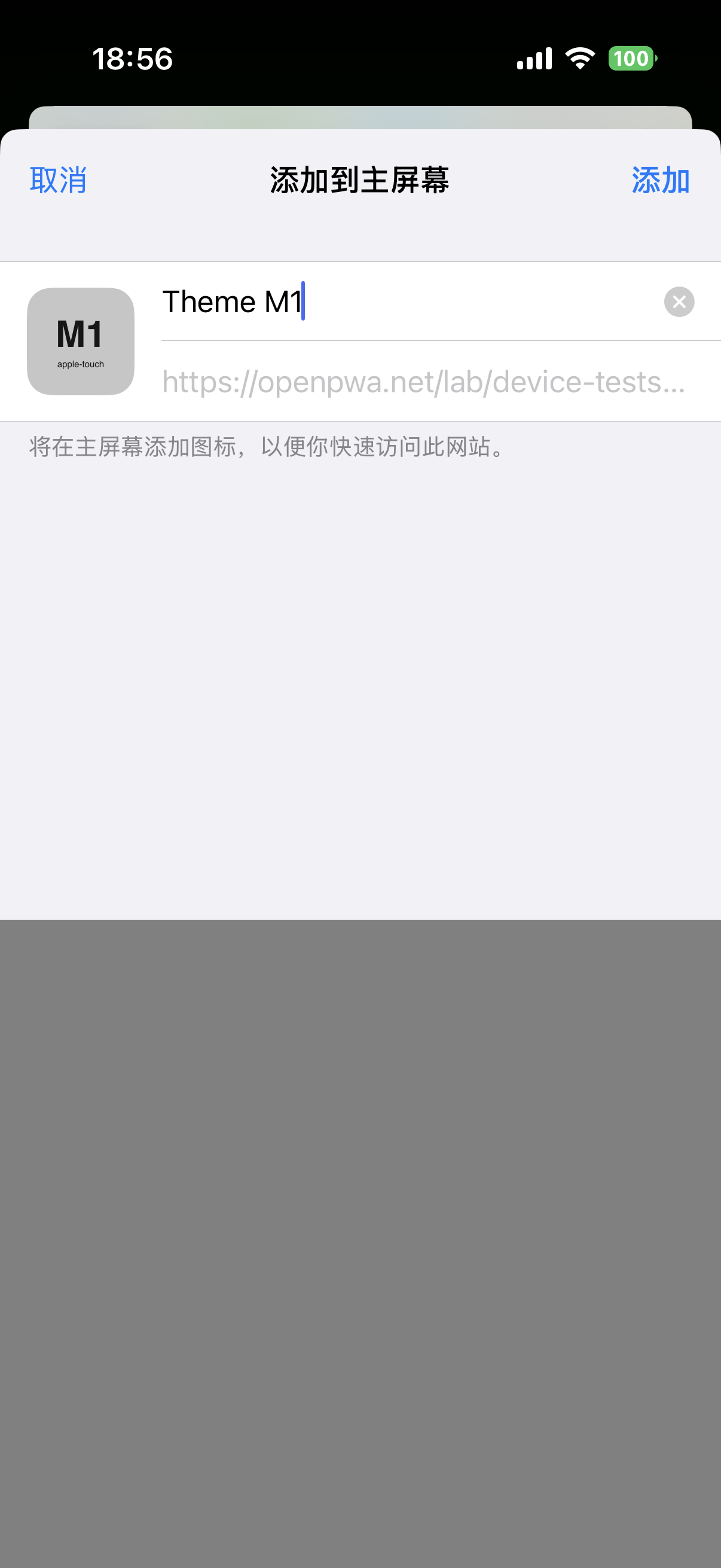
The Add to Home Screen sheet for the probe page itself was not captured. The sheet captured later for a page with a manifest showed the title 添加到主屏幕, an editable name, the URL and the buttons 取消 and 添加, with no “Open as Web App” switch (S+O, N66). The install flow itself is described in iOS Add to Home Screen.
WebKit’s iOS 16.4 announcement says a site whose manifest sets display to standalone or fullscreen “becomes a Home Screen web app”, and without such a manifest (and without a meta tag marking the site as web app capable) the site “will be saved as a Home Screen bookmark”, which from iOS 16.4 opens in the user’s default browser (Web Push for Web Apps on iOS and iPadOS, webkit.org). Apple’s archived meta-tag reference says the same from the other side: without apple-mobile-web-app-capable, “The default behavior is to use Safari to display web content” (Supported Meta Tags, developer.apple.com).
The measurement agrees with these sources. On this build, the page used Safari’s process and viewport size, along with Safari’s storage and service worker.
WebKit describes the changed rule in iOS 26 as follows. “By default, every website added to the Home Screen opens as a web app”, and the user can turn off “Open as Web App” in the sheet (WebKit Features in Safari 26.0, webkit.org). Maximiliano Firtman’s notes record the same change (iOS PWA Compatibility, firt.dev). This run is therefore a pre-26 control. None of these sources describes the add sheet on 18.x; the missing switch on 18.6.2 is consistent with WebKit’s statement that the switch arrived in 26.
The reads and screenshots are in the data package for the iOS 18.6.2 study (CC BY 4.0):
Machine-readable rows for this topic are in /lab/results.json. Cite as “OpenPWA device test, 2026-10-20, iPhone 16 Pro, iOS 18.6.2 (22G100), N23”. The study write-up is Testing Home Screen web apps on iOS 18.6.2.
The result supports the statement that before iOS 26 a page added to the Home Screen with no manifest and no apple-mobile-web-app-capable meta opens in the browser, not as a web app. On iOS 18.6.2 that browser was Safari; the default-browser setting was not recorded.
Reference entries
Related issues and bugs
- One iPhone 16 Pro, one build (22G100), one operator, one run day. The phone was not wiped and carried other sites’ Home Screen items.
- Not run: T1 steps 4 to 6 (a same-origin link and a cross-origin link followed from the icon, and which URL opens on relaunch).
- A Safari tab on the same URL had been open since the page was added. The page list cannot tell whether Safari reused that tab or opened a new one (N23).
- The default-browser setting was not recorded. The result is that the item opened in Safari; WebKit’s rule says “default browser”.
- The probe page’s own add sheet was not captured. An earlier manifest-less check on a reference page (N02) rests on console values the operator copied by hand and is not part of the published result.
- The probe has no
apple-mobile-web-app-capable meta; a page with that meta and no manifest was not tested.
- iOS 26 and later were not tested here.
Device steps performed by an OpenPWA operator on an iPhone 16 Pro. AI agent sessions read page state over USB, kept the notebook and drafted this text; automated gates and an AI fact-check checked it. No person reviews each entry.