Manifest member in Manifest
share_target manifest member
Published Updated
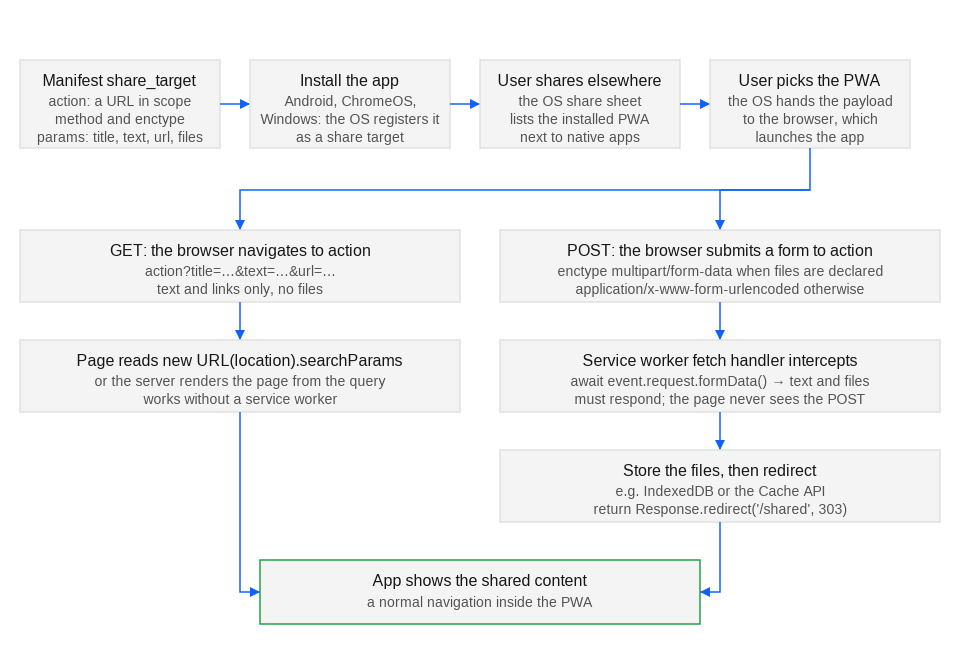
The share_target manifest member registers an installed web app as a destination in the operating system’s share
sheet. When the user picks the app, the browser delivers the shared title, text, URL, and files to
a URL inside the app’s scope, either as query parameters on a GET navigation or as a POST body
encoded as application/x-www-form-urlencoded or multipart/form-data. Files travel only in a
multipart/form-data POST, which a service worker can intercept.
Chrome reads the member on Android from 76 and on desktop from 89 (BCD
manifests.webapp.share_target). BCD records Opera from 76 and Opera for Android from 63, and
mirrors Edge from Chrome (89) and Samsung Internet from Chrome for Android (12.0). Android WebView
does not support it. Firefox has not implemented it (bug 1476515),
and on Firefox for Android the member parses but has no effect. Safari has not implemented it on
macOS or iOS (webkit.org/b/194593). Where it is unsupported, the
app does not appear in the share sheet. The member is the receiving half of sharing; the sending
half is navigator.share().
The specification is a Web Share Target
(w3c.github.io) document of the W3C Web Applications Working Group. Its ReSpec configuration
declares specStatus: "unofficial" pending a First Public Working Draft, so it is an editor’s
draft rather than a published W3C Recommendation-track report.
Member
Section titled “Member”| Property | Value |
|---|---|
| Type | object with action (in-scope URL that receives the share), method ("GET" or "POST"), enctype ("application/x-www-form-urlencoded" or "multipart/form-data"), and params, an object mapping the shared fields to parameter names: title, text, url, and files, an array of { "name", "accept" } where accept lists MIME types or extensions. |
| Default | absent, so the app is not a share target. Inside the object method defaults to "GET" and enctype to "application/x-www-form-urlencoded". |
| Example value | { "action": "/share", "method": "GET", "params": { "title": "title", "text": "text", "url": "url" } }. |
Chromium validates the combination and drops the whole member on a bad one, logging to the
manifest’s error list: invalid method. Allowed methods are:GET and POST. (the source string has
no space after the colon), invalid enctype for GET method. Only application/x-www-form-urlencoded is allowed., files are only supported with multipart/form-data POST., and property 'share_target' ignored. Property 'action' is invalid.
when action is cross-origin or outside scope. Files therefore require "method": "POST" with
"enctype": "multipart/form-data"; text-only targets work with the defaults.
The app must be installed before it appears in the share sheet. Android shows it alongside native apps; a user who has not
installed the PWA has no way to share into it, which is why a share-target page also needs an
ordinary route for pasted content. When the shared payload has a text but no url, Chrome on
Android often places the link inside text, so handlers parse both fields.
Examples
Section titled “Examples”Receiving a link and text with a GET navigation
Section titled “Receiving a link and text with a GET navigation”A read-later app accepts the three text fields. The share opens
/share?title=…&text=…&url=… in the installed app, and the page reads the query string on load.
Because Android sometimes delivers the link in text, the handler falls back to the first URL it
finds there. The page only fills in a draft for the user to confirm: the specification says a share
should arrive as a POST when the request causes an immediate side effect, so a target that saves
on arrival belongs on the POST path below.
{ "share_target": { "action": "/share", "method": "GET", "params": { "title": "title", "text": "text", "url": "url" } }}const params = new URLSearchParams(location.search);const text = params.get('text') ?? '';const url = params.get('url') ?? text.match(/https?:\/\/\S+/)?.[0] ?? null;
if (url) { showDraft({ title: params.get('title') ?? '', url }); // the user presses Save to keep it} else { showPasteForm(text); // nothing shareable arrived: let the user paste a link instead}Receiving files through the service worker
Section titled “Receiving files through the service worker”Images need POST and multipart encoding. The service worker intercepts the POST to action, reads
the form data, stores the files, and answers with a 303 redirect so the client lands on a normal GET
page, and a reload then requests that page instead of the POST.
{ "share_target": { "action": "/share/upload", "method": "POST", "enctype": "multipart/form-data", "params": { "title": "title", "files": [{ "name": "photos", "accept": ["image/jpeg", "image/png", "image/webp"] }] } }}self.addEventListener('fetch', (event) => { const url = new URL(event.request.url); if (event.request.method !== 'POST' || url.pathname !== '/share/upload') return;
event.respondWith((async () => { const form = await event.request.formData(); const files = form.getAll('photos'); const cache = await caches.open('shared-inbox'); await Promise.all(files.map((file, i) => cache.put(`/shared/${Date.now()}-${i}`, new Response(file)))); return Response.redirect('/share/review', 303); })());});The /share/review page lists caches.open('shared-inbox') and lets the user confirm before the
files go to the server. The service worker stores the files without a network request; for the
review page itself to load offline, precache it as well, which Chrome’s guide advises for the
action page.
Falling back when the app is not installed
Section titled “Falling back when the app is not installed”The share sheet only lists installed apps, and Safari and Firefox do not register web apps as
share targets at all. A route that
accepts pasted content and, where navigator.share exists, offers the outgoing direction keeps the
feature usable everywhere.
const canSend = 'share' in navigator;
document.querySelector('#share-out').hidden = !canSend;document.querySelector('#hint').textContent = canSend  ? 'Paste a link or text in the box, or share out with the button.'  : 'Paste a link or text in the box.';
The Web Share Target specification defines no way for a page to ask whether it is registered as
a share target.
display-mode: standalone only says the page runs in an app window, not that the browser supports
or registered share_target, and BCD records browsers that do not. The hint therefore makes no promise of
incoming shares.
See also
Section titled “See also”- Receive shared content (share target)
- Web Share API: native share sheet from the browser
- scope manifest member
- file_handlers manifest member
- Web Share Target API (w3c.github.io)
- Receiving shared data with the Web Share Target API (developer.chrome.com)
Specifications
| Specification | Status |
|---|---|
| manifest: share_target | W3C draft |