API in Installation
beforeinstallprompt event
Published Updated
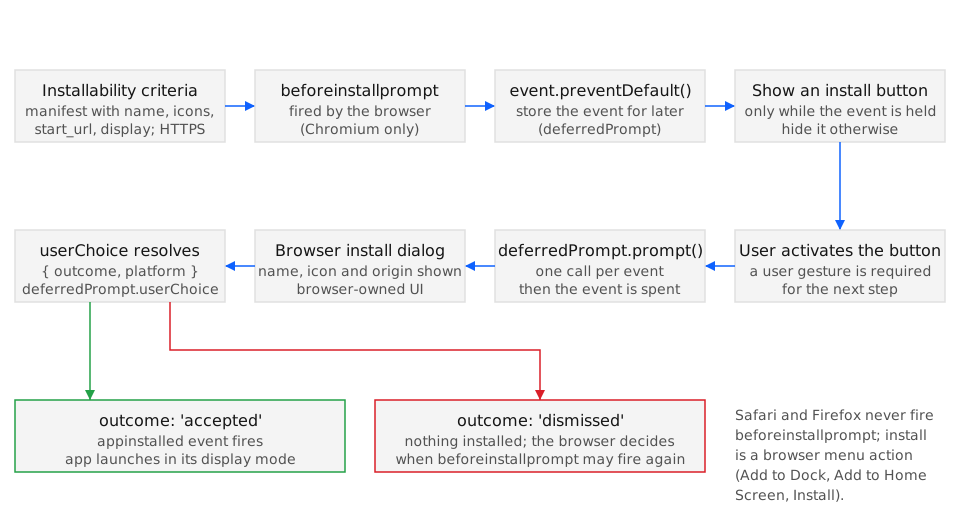
beforeinstallprompt is the window event a Chromium browser fires once a page meets its installability criteria; the handler calls preventDefault() to hold back the browser’s own banner, keeps the BeforeInstallPromptEvent, and later calls prompt() from a click so the install dialog opens at a moment the page chooses. Chrome 68 on Android, Chrome 73 on desktop, Edge 79, and Samsung Internet 9.0 fire it; Safari (iOS and macOS) and Firefox never do, and install only from their own menus (BCD api.BeforeInstallPromptEvent).
Syntax
Section titled “Syntax”window.addEventListener('beforeinstallprompt', (event) => { event.preventDefault(); // keep the browser's banner from showing now deferred = event; // one-shot: usable for a single prompt()});
const { outcome, platform } = await deferred.prompt(); // from a user gesture// or: const { outcome, platform } = await deferred.userChoice;
window.addEventListener('appinstalled', () => { /* installed from any UI */ });prompt() returns a promise for the same { outcome, platform } object that userChoice resolves with, so either can be awaited. appinstalled fires on window whether the install came from prompt(), from the address-bar icon, or from the browser menu.
Members
Section titled “Members”BeforeInstallPromptEvent extends Event with two members; appinstalled is a plain Event.
| Member | Type | Description |
|---|---|---|
platforms |
readonly string[] |
The install targets the browser offers, for example ["web"] on desktop or ["web", "play"] on Android when the manifest lists a Play app with prefer_related_applications. |
userChoice |
Promise<{ outcome, platform }> |
Resolves after the dialog closes. outcome is "accepted" or "dismissed"; platform is the chosen entry of platforms, or "" when dismissed. |
prompt() |
Promise<{ outcome, platform }> |
Shows the browser’s install dialog. Allowed once per event and only with transient user activation. |
preventDefault() |
inherited | Stops the browser from showing its own install banner (the Android mini-infobar) for this installability check. |
When the event fires
Section titled “When the event fires”The page must be served over HTTPS (or from localhost) and link a manifest with name or short_name, start_url, a display other than browser, and icons that include 192 px and 512 px sizes. Chrome dropped the service-worker requirement for installing from the browser menu in Chrome 108 on Android and Chrome 112 on desktop, supplying a default offline page; the Chrome team’s post on that change notes that the heuristic behind beforeinstallprompt still looked for a fetch handler, so a page without a service worker can be installable from the menu and still not receive the event. Chrome also withholds the event while the app is already installed and until its engagement heuristics are met.
Exceptions
Section titled “Exceptions”prompt() rejects; nothing else in this API throws.
NotAllowedError:prompt()was called without transient user activation, for example on page load or from a timer. Chromium’s message isThe prompt() method must be called with a user gesture.InvalidStateError:prompt()was called a second time on the same event, or the event’s underlying banner request is no longer valid (the page navigated, or the browser already showed its own UI).
In Safari and Firefox the event does not fire, so there is no event object to misuse; code that assumes a prompt will come simply leaves its button hidden.
Examples
Section titled “Examples”Both examples run in the page; the service worker and manifest are assumed to be in place.
Deferring the event and prompting from a button
Section titled “Deferring the event and prompting from a button”The handler stores the event and reveals a button. The click handler calls prompt(), reads the outcome, and clears the stored event because it is single-use. The appinstalled listener hides the button for installs that came from the browser’s own UI.
let deferred = null;const button = document.querySelector('#install');
window.addEventListener('beforeinstallprompt', (event) => {  event.preventDefault();  deferred = event;  button.hidden = false;});
button.addEventListener('click', async () => {  if (!deferred) return;  const { outcome, platform } = await deferred.prompt();  deferred = null;                       // the event is single-use  button.hidden = true;  if (outcome === 'accepted') analytics.track('install_accepted', { platform });});
window.addEventListener('appinstalled', () => {  deferred = null;  button.hidden = true;});
A dismissal costs more than a lost click: Chrome applies its own cool-down before firing beforeinstallprompt again for the same site, so showing the button after a completed task rather than on first paint keeps the one event the page gets for a moment when acceptance is likely.
Detecting support and guiding Safari users instead
Section titled “Detecting support and guiding Safari users instead”Safari does not fire the event. The page can still detect whether it is already running installed (display-mode: standalone, or the legacy navigator.standalone on iOS) and, if not, show Share-sheet instructions in place of a button that would not appear.
const installed =  window.matchMedia('(display-mode: standalone)').matches ||  navigator.standalone === true;                        // iOS Safari only
const supportsPrompt = 'onbeforeinstallprompt' in window;
if (installed) {  hideAllInstallUi();} else if (!supportsPrompt) {  // Safari and Firefox: no event will come. Explain the manual route.  showHint(/iPhone|iPad/.test(navigator.userAgent)    ? 'Tap Share, then "Add to Home Screen".'    : 'Use your browser menu to install this app.');}// Chromium: wait for beforeinstallprompt before showing anything.
'onbeforeinstallprompt' in window is true in every Chromium browser that implements the event, so the hint branch runs only where no event will come; the Chromium branch keeps the install UI hidden until the event confirms installability.
See also
Section titled “See also”- Web Manifest Application Information and incubations: BeforeInstallPromptEvent (wicg.github.io)
- Changes to the installability criteria (developer.chrome.com)
- Install prompt browser support
- Installability criteria
- Install prompt UX
- iOS Add to Home Screen
- WebAPK
Specifications
| Specification | Status |
|---|---|
| Install Prompt (beforeinstallprompt) | WICG draft |
- Legend
- Yes
- Partial
- Flag
- No
- Unknown
| Browser / Platform | Support | Versions | Confidence | Source | Notes |
|---|---|---|---|---|---|
| Chrome (Android) | Yes | 68 | medium | source | — |
| Chrome (Desktop) | Yes | 73 | medium | source | — |
| Edge (Desktop) | Yes | 79 | medium | source | — |
| Safari (iOS) | No | — | medium | source | 1 |
| Safari (macOS) | No | — | medium | source | 2 |
| Firefox (Desktop) | No | — | medium | source | 3 |
| Samsung Internet | Yes | 9.0 | medium | source | — |
- No beforeinstallprompt; install is manual via the Share sheet → Add to Home Screen.
- Install is via the File → Add to Dock menu, not the web event.
- No manifest-based desktop install path.
Try it
Run this capability in the OpenPWA demo app: /demo/#install