Behaviour · Measured 2026-10-20, iPhone 16 Pro, iOS 18.6.2 (22G100) · A, Instrumented read · Differs from BCD
In an iOS 18.6.2 Home Screen web app whose manifest sets display to standalone, which display-mode media queries match, what does navigator.standalone return, and how much of the screen does the page’s viewport get compared with a Safari tab on the same iPhone?
The two apps matched only standalone mode on an iPhone 16 Pro running iOS 18.6.2 (22G100). On 2026-10-20, their portrait viewport measured 402 x 812 CSS px on a 402 x 874 screen.
The page under test was the OpenPWA demo (/demo/), whose manifest sets display: standalone with /demo/ for id and for both start_url and scope. The device lab app (/lab/device-tests/, also display: standalone) served as a second app. Neither page sets viewport-fit=cover or a status-bar-style meta.
An agent evaluated a read-only expression over USB in each context to record:
navigator.standalone;matchMedia('(display-mode: X)').matches for seven values: browser, minimal-ui, standalone, fullscreen, window-controls-overlay, picture-in-picture and application;innerWidth x innerHeight and the sizes of visualViewport and screen, in CSS px;- the four
env(safe-area-inset-*) values, measured with a probe element;
- for the lab app in landscape, a narrower read:
navigator.standalone, the display-mode: standalone query, the inner size, the visualViewport height, the orientation and the four safe-area insets.
We tested a Safari tab (WebDriver automation on four pages, N03 and N06, plus the operator’s normal Safari profile, N08 to N10), the demo app at its first launch from the Home Screen (07:21:34 UTC, N13), the lab app at its first launch (07:34:15 UTC, N18) and the lab app rotated to landscape (08:12:01 UTC, N31).
- If an “OpenPWA” icon from an earlier test is on the Home Screen, remove it (long-press → Remove App → Delete).
- In Safari, open
https://openpwa.net/demo/. The page shows which display mode it runs in.
- Tap Share → Add to Home Screen → Add.
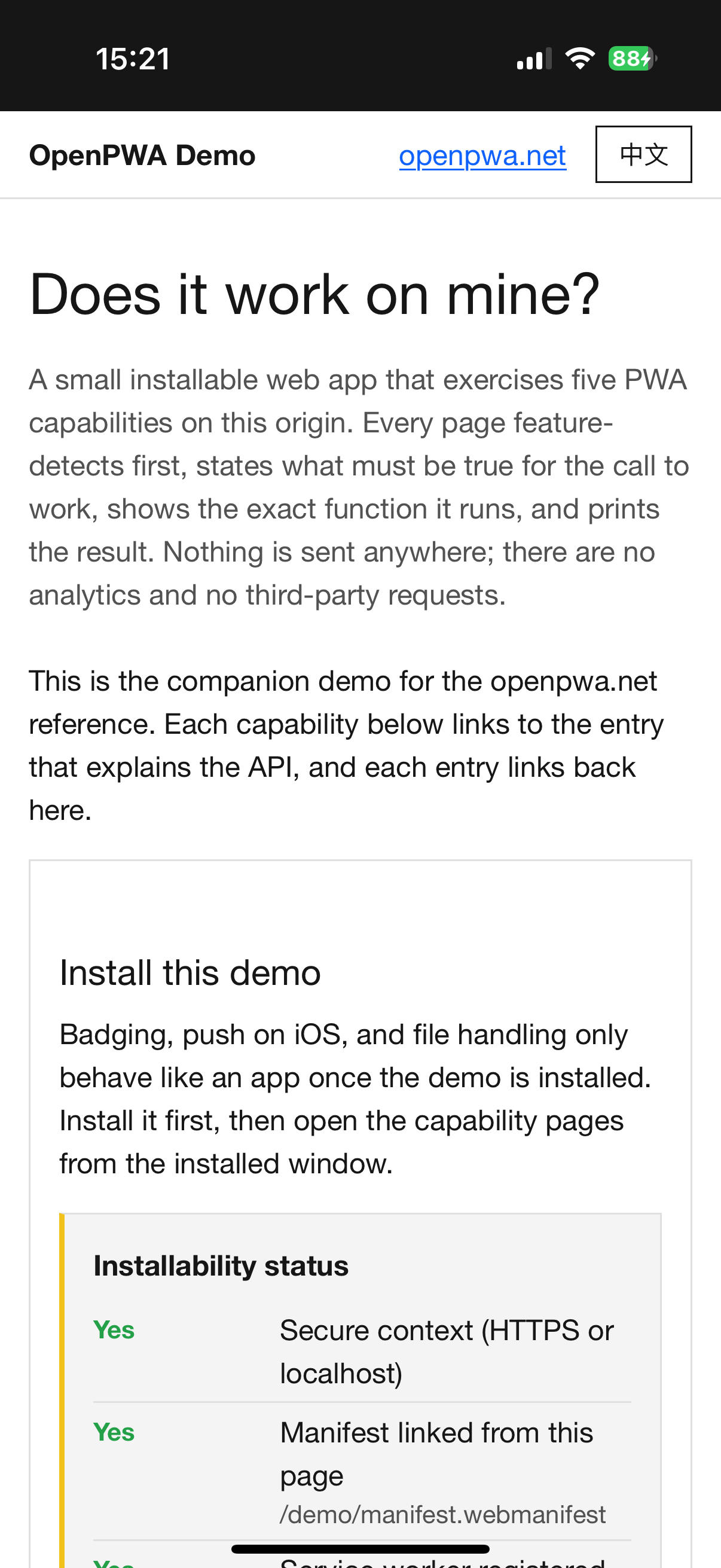
- Open the new OpenPWA icon. The page line should read “Running as an installed app: display-mode: standalone (iOS navigator.standalone)”. Take a screenshot of the top of the page.
- With Web Inspector (Settings → Apps → Safari → Advanced → Web Inspector on, then Mac Safari → Develop → your iPhone → the OpenPWA app), run in the console:
['browser','minimal-ui','standalone','fullscreen','window-controls-overlay','picture-in-picture','application'].map(m => m + ':' + matchMedia('(display-mode: ' + m + ')').matches), then [navigator.standalone, innerWidth, innerHeight, screen.width, screen.height].
- Run the same two lines in a Safari tab on
https://openpwa.net/demo/ for the comparison.
- Optional: rotate the app to landscape and read
innerWidth and innerHeight again, along with screen.orientation.type.
- T2 Install the demo and launch it (4 min)
Demo page: /demo/ - T5 Display mode in a tab and in the app (3 min)
Harness v1: Open the test
Demo page: /demo/
On iOS 18.6.2 the demo app returned navigator.standalone true; display-mode: standalone matched and the six other queries, fullscreen included, did not. The inner size and visualViewport were 402 x 812 CSS px on a 402 x 874 screen, with all four safe-area insets 0, and the page displayed this line: “Running as an installed app: display-mode: standalone (iOS navigator.standalone)” (A, N13; S, screenshot T2_2). The lab app gave the same mode and size (A, N18). In Safari tabs navigator.standalone was false, only display-mode: browser matched and the inner size was 402 x 678 (A, N03, N06). In landscape the lab app reported landscape-primary, display-mode: standalone, an inner size of 750 x 402 and insets 0 (A, N31); that read did not record the screen size. The confidence label is A+S.
2026-10-20, iOS 18.6.2
In the demo and PWA Lab Home Screen apps only display-mode: standalone matched, navigator.standalone was true and the viewport was 402 x 812 on a 402 x 874 screen. In a Safari tab only browser matched, with a 402 x 678 viewport.
- Date
- 2026-10-20
- Device
- iPhone 16 Pro
- OS and build
- iOS 18.6.2 (22G100), release
- Context
- Safari tab and Home Screen app
- Result
- As expected
- Key values
tabViewport: 402x678appViewport: 402x812screen: 402x874tabDisplayMode: browserappDisplayMode: standalonetabNavigatorStandalone: falseappNavigatorStandalone: trueappSafeAreaInsets: 0/0/0/0
- Confidence
- A, Instrumented read
- Tests
- T2, T5
- Notebook entries
- N03, N13, N18
- Study
- Read the study · Data package
- Harness
- Harness v1
Harness v1 files used (2), served SHA-256
/lab/device-tests/ 42c90845419f5ed3ad15d941bea04f649f4c5d350b1847292292fadd55871486/lab/device-tests/manifest.webmanifest cab4e60719fd1f9c84d04aada2ad6cd937f50615ce646c3ed20f14f0ca09832b
In portrait, 62 CSS px of the 874 px screen height lie outside the 812 px viewport. How that strip is coloured and when a page can draw under it are measured in status-bar colour source and black-translucent geometry.
The Web Application Manifest says that in standalone “the user agent will exclude standard browser UI elements such as an URL bar, but can include other system UI elements such as a status bar”, while fullscreen “takes up the entirety of the available display area” (Web Application Manifest, display member, w3.org). A viewport that stops below a visible status bar fits standalone. MDN describes the display-mode feature the same way (display-mode, MDN). Apple’s archived meta-tag reference names window.navigator.standalone as the way to detect the full-screen web app mode (Supported Meta Tags, developer.apple.com).
Browser-compat-data (BCD) lists css.at-rules.media.display-mode for Safari on iOS from 12.2. Its note on the standalone value says that in an installed web app with display: standalone, “display-mode: standalone is false and display-mode: fullscreen is true”, citing WebKit bug 264218 (BCD css/at-rules/media.json, github.com, read 2026-10-20). That bug was reported against iOS 17 in 2023 and has status NEW (Bug 264218, bugs.webkit.org).
The result agrees with the manifest specification and Apple’s reference. It differs from the BCD note on this build. On iOS 18.6.2 two apps declared display: standalone, and in both standalone matched and fullscreen did not. One build cannot show in which release the behaviour changed. BCD’s other notes hold here: minimal-ui was false, and browser matched in the Safari tab.
From the iOS 18.6.2 data package (CC BY 4.0):
Notebook entries N03, N06, N13, N18 and N31 are in 2026-10-ios18-baseline.md. Rows: /lab/results.json. Cite as “OpenPWA device test, 2026-10-20, iPhone 16 Pro, iOS 18.6.2 (22G100), N13”.
The result supports the display and display-mode statements for Safari on iOS, including the display manifest member entry, with measured viewport sizes for one iPhone.
Reference entries
Compatibility data
- One iPhone 16 Pro (402 CSS px wide in portrait), one build, one operator. Other screen sizes and iPad were not tested.
- Only
display: standalone was tested. Manifests with fullscreen or minimal-ui were not installed.
- The 62 px figure comes from subtracting inner height from screen height. The status bar was not measured directly.
- Landscape rests on one read of the lab app. Whether the app showed a status bar in landscape is not established: the operator’s answers on that point belong to a series later marked uncertain (N46), and the landscape screenshot shows a Safari tab; it does not show the app (N63).
- Appearance was Light in every read (
prefers-color-scheme: dark false). Dark was not measured.
- iOS 26 and later were not tested here.
Device steps performed by an OpenPWA operator on an iPhone 16 Pro. AI agent sessions read page state over USB, kept the notebook and drafted this text; automated gates and an AI fact-check checked it. No person reviews each entry.