API in Service Worker
Periodic Background Sync API
Published
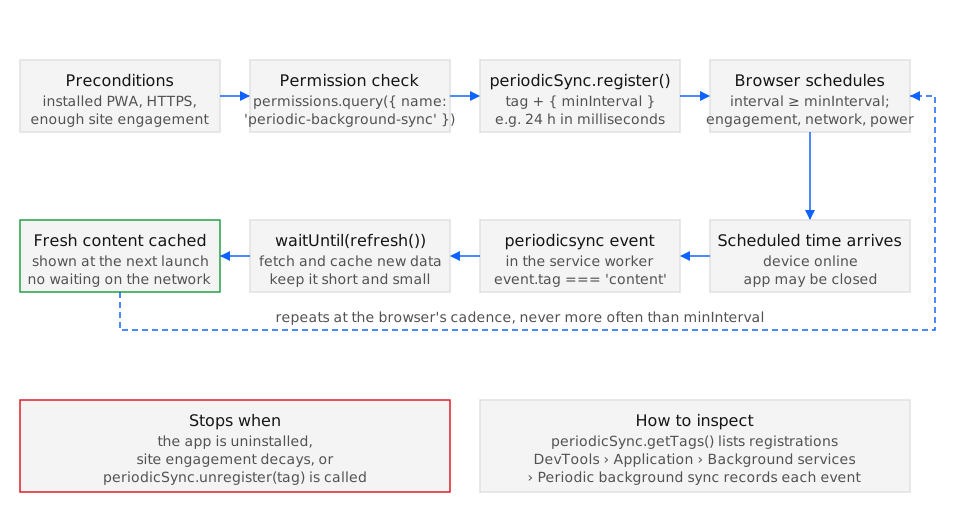
The Periodic Background Sync API lets an installed web app register a named task that the browser runs in the service worker at intervals it chooses, no more often than the minInterval the app asks for, so content is already fresh when the user next opens the app. It shipped in Chrome 80, Edge 80, and Samsung Internet 13, is not implemented in Firefox or Safari (BCD api.PeriodicSyncManager), and Chrome only grants it to apps that are installed and have a site-engagement score above zero.
Syntax
Section titled “Syntax”// Page or service workerconst registration = await navigator.serviceWorker.ready;await registration.periodicSync.register(tag, { minInterval });const tags = await registration.periodicSync.getTags();await registration.periodicSync.unregister(tag);
// Service workerself.addEventListener('periodicsync', (event) => { event.waitUntil(refresh(event.tag));});register() returns a Promise<undefined> once the registration is stored; registering an existing tag replaces its minInterval. getTags() resolves with every tag still registered, and unregister() resolves with undefined whether or not the tag existed. The periodicsync event carries only tag; unlike one-off background sync there is no lastChance, because a failed run is simply followed by the next scheduled one.
Parameters
Section titled “Parameters”The method takes a tag and an options object.
| Name | Type | Description |
|---|---|---|
tag |
string |
Identifies the registration and is delivered as PeriodicSyncEvent.tag. One registration per tag; several tags can run on different cadences. |
options.minInterval |
number |
Minimum milliseconds between two runs. The browser treats it as a floor, not a schedule: Chrome aligns the real frequency with how often the app is used and with the device’s power and connectivity state, and it skips a run entirely when the engagement score is zero. |
Chrome also requires a previously used network to be present before it fires the event, so a device on a network it has not used before does not sync until the user opens the app once on that network.
Exceptions
Section titled “Exceptions”register() rejects in three cases (MDN, PeriodicSyncManager.register()).
InvalidStateError(DOMException): the registration has no active service worker. Awaitnavigator.serviceWorker.readyfirst.NotAllowedError(DOMException): theperiodic-background-syncpermission is not granted. In Chrome this is the state in any ordinary browser tab, because the permission is only granted to an installed app; the same code succeeds once the app is launched from its own window.InvalidAccessError(DOMException): the calling window is not a top-level or auxiliary browsing context, for example an iframe.TypeError:registration.periodicSyncisundefinedin Firefox and Safari, so the member access itself throws. Feature-detect with'periodicSync' in registration.
Examples
Section titled “Examples”The examples share one service worker at /sw.js and a news feed cached under the name news.
Registering a daily refresh after checking the permission
Section titled “Registering a daily refresh after checking the permission”The page queries the permission before calling register() so that an uninstalled app does not hit NotAllowedError, and it shows the user a “refresh on open” notice instead.
async function enableDailyRefresh() { const status = await navigator.permissions.query({ name: 'periodic-background-sync' }); if (status.state !== 'granted') { showNotice('Install the app to get headlines refreshed in the background.'); return; } const registration = await navigator.serviceWorker.ready; await registration.periodicSync.register('news-refresh', { minInterval: 24 * 60 * 60 * 1000, });}Firefox and Safari throw a TypeError from permissions.query() for an unknown permission name, so a cross-browser caller wraps the query in try/catch and treats the failure as “not granted”.
Handling the event in the service worker
Section titled “Handling the event in the service worker”The worker fetches the feed and stores it; a thrown error rejects the waitUntil() promise, which the browser logs and ignores until the next scheduled run.
self.addEventListener('periodicsync', (event) => { if (event.tag !== 'news-refresh') return; event.waitUntil((async () => { const response = await fetch('/api/headlines', { cache: 'no-store' }); if (!response.ok) throw new Error(`headlines: ${response.status}`); const cache = await caches.open('news'); await cache.put('/api/headlines', response); })());});Keep the work short: Chrome ends the event after its own execution limit, and a worker that is still running then is terminated without the cache write completing.
Detecting support and refreshing on return instead
Section titled “Detecting support and refreshing on return instead”When periodicSync is missing, or the permission is not granted, the fallback refreshes the feed when the page regains visibility, which covers the “fresh on open” goal for a tab or an uninstalled app at the cost of one visible network wait.
async function setUpRefresh(refreshNow) { const registration = await navigator.serviceWorker.ready; if ('periodicSync' in registration) { try { await registration.periodicSync.register('news-refresh', { minInterval: 24 * 60 * 60 * 1000 }); return; } catch { // Rejected in a plain browser tab: fall through to the foreground fallback. } } document.addEventListener('visibilitychange', () => { if (document.visibilityState === 'visible') refreshNow(); }); refreshNow();}The fallback runs only while the page exists; it cannot refresh content for a closed app, which is the gap the API closes.
See also
Section titled “See also”- Web Periodic Background Synchronization: register() method (wicg.github.io)
- Richer offline experiences with the Periodic Background Sync API (developer.chrome.com)
- Periodic Background Sync browser support
- Background Sync API
- Periodic background sync for content updates
- Service worker lifecycle
Specifications
| Specification | Status |
|---|---|
| Periodic Background Sync | WICG draft |
- Legend
- Yes
- Partial
- Flag
- No
- Unknown
| Browser / Platform | Support | Versions | Confidence | Source | Notes |
|---|---|---|---|---|---|
| Chrome (Desktop) | Yes | 80 | high | source | — |
| Chrome (Android) | Yes | 80 | high | source | 1 |
| Edge (Desktop) | Yes | 80 | high | source | 2 |
| Firefox (Desktop) | No | — | high | source | 3 |
| Firefox (Android) | No | — | high | source | 45 |
| Safari (macOS) | No | — | high | source | 6 |
| Safari (iOS) | No | — | high | source | 78 |
| Samsung Internet | Yes | 13.0 | high | source | 9 |
| WebView (Android) | No | — | high | source | 10 |
- Derived by browser-compat-data mirroring from Chrome.
- Derived by browser-compat-data mirroring from Chrome.
- No Firefox support is recorded in browser-compat-data.
- No Firefox for Android support is recorded in browser-compat-data.
- Derived by browser-compat-data mirroring from Firefox.
- No Safari support is recorded in browser-compat-data.
- No Safari on iOS support is recorded in browser-compat-data.
- Derived by browser-compat-data mirroring from Safari.
- Derived by browser-compat-data mirroring from Chrome Android.
- Implementation tracking: https://crbug.com/40151529.