Concept in Notifications
Periodic background sync for content updates
Published Updated
Periodic background sync lets an installed PWA refresh its cached content on a schedule the
browser chooses, by firing a periodicsync event in the service worker while no page is open.
A news or weather app can use it to open with current data without waiting for a refresh.
It is Chromium-only and requires installation and regular use of the app.
How it works
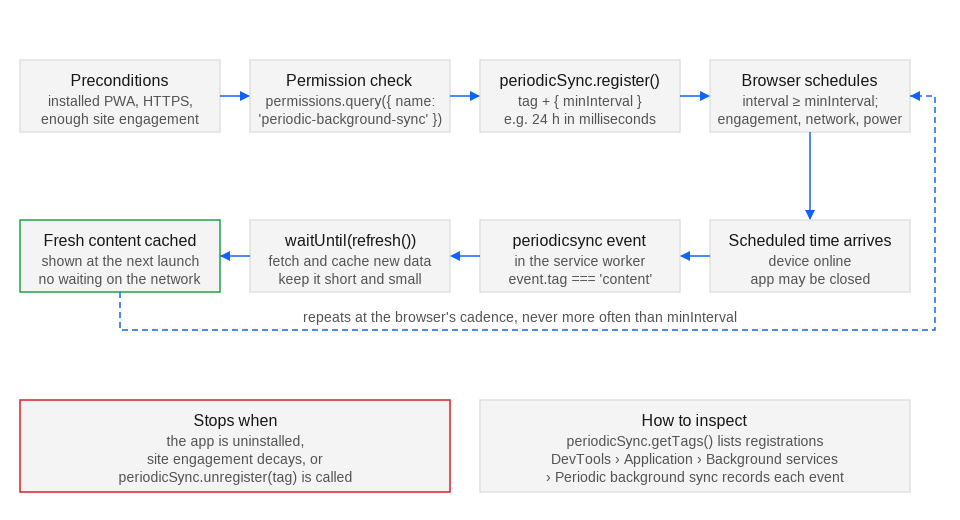
Section titled “How it works”The page registers a tag with registration.periodicSync.register(tag, { minInterval }); the
browser then fires periodicsync in the service worker no more often than minInterval, when
the device is online, and only while the app’s engagement permits it. The API surface
(PeriodicSyncManager, register(), getTags(), unregister(), the periodicsync event) is in
Chrome 80 and Edge 80, other Chromium browsers inherit it, and Firefox and Safari have none (BCD api.PeriodicSyncManager); the method-level reference
is the service worker entry.
Chrome’s gates
Section titled “Chrome’s gates”Chrome fires the event only for a web app the user has installed and launched as a standalone
app, not for a site in a tab, and only when the device is on a network it has used before
(Periodic background sync,
developer.chrome.com). The frequency is tied to the site engagement score Chrome keeps per origin,
visible at about://site-engagement/: a score of zero means no events at all, and a higher score
allows syncs closer to minInterval. If the user stops opening the app, the score decays and
the events stop. minInterval is therefore a floor rather than a schedule, and a registration with
minInterval: 0 leaves the cadence entirely to Chrome.
Permission
Section titled “Permission”The feature is gated by the periodic-background-sync permission. Chrome derives it from installation and shows no prompt: its permission context allows the origin once an app is installed, and the user can still change the setting. Check it with navigator.permissions.query({ name: 'periodic-background-sync' }) from a window or a service worker; only granted means you can use the API. register() rejects with NotAllowedError when the permission is not granted, InvalidStateError when the
registration has no active worker, and InvalidAccessError when called from a window that is neither a
top-level nor an auxiliary browsing context (PeriodicSyncManager: register(),
developer.mozilla.org).
What it is for, and what it is not
Section titled “What it is for, and what it is not”Background sync, despite the similar name, retries a failed request once connectivity returns;
periodic background sync pulls fresh data on a cadence. Web Push also wakes the worker but
interrupts the user with a notification, and Chrome and Edge reject a subscription that is not userVisibleOnly (PushManager.subscribe()). Periodic sync refreshes
on a repeating basis without a notification, which makes it right for a daily article cache and wrong for
anything that must happen at a particular time; the
notification triggers entry covers why no shipped API fills that gap.
Examples
Section titled “Examples”Keep a page-load refresh as the fallback, and skip it when a periodic sync is registered.
Registering a daily article refresh when the app can
Section titled “Registering a daily article refresh when the app can”Register after the service worker is active and the permission is granted. The feature and permission checks send engines without the API and Chrome tabs to refreshing on load; the catch covers a register() that still rejects.
async function enableDailyRefresh() { const registration = await navigator.serviceWorker.ready; if (!('periodicSync' in registration)) { return refreshOnLoad(); // Firefox, Safari, or an uninstalled Chrome tab } const status = await navigator.permissions.query({ name: 'periodic-background-sync' }); if (status.state !== 'granted') return refreshOnLoad(); try { await registration.periodicSync.register('update-articles', { minInterval: 24 * 60 * 60 * 1000 }); } catch { refreshOnLoad(); // permission denied or no active worker: behave as before }}refreshOnLoad() is the pre-existing behaviour, so an engine without the API loses nothing; periodic sync can avoid the load-time refresh where it is available.
Handling the event and skipping the load-time refresh
Section titled “Handling the event and skipping the load-time refresh”The worker caches the response inside event.waitUntil(); the page checks getTags() and skips
its own refresh when the sync is registered, on the bet that the worker has kept the cache fresh. A registered tag does not prove a sync has run yet.
// service workerself.addEventListener('periodicsync', (event) => {  if (event.tag === 'update-articles') {    event.waitUntil(caches.open('articles').then((cache) => cache.add('/api/articles')));  }});
// pageasync function maybeRefresh(registration) {  const tags = 'periodicSync' in registration ? await registration.periodicSync.getTags() : [];  if (!tags.includes('update-articles')) refreshOnLoad();}
Keep the handler small because Chrome gives the worker a limited window. Chrome gates the feature on engagement so that apps do not gratuitously consume battery or data, so keep downloads small.
See also
Section titled “See also”- Web Periodic Background Synchronization (wicg.github.io)
- Periodic background sync (developer.chrome.com)
- PeriodicSyncManager.register()
- Background sync
- Web Push and PushManager.subscribe()
- Notification triggers (showTrigger)
Specifications
| Specification | Status |
|---|---|
| Periodic Background Sync | WICG draft |
- Legend
- Yes
- Partial
- Flag
- No
- Unknown
| Browser / Platform | Support | Versions | Confidence | Source | Notes |
|---|---|---|---|---|---|
| Chrome (Desktop)# | Yes | 80 | high | source | — |
| Chrome (Android)# | Yes | 80 | high | source | 1 |
| Edge (Desktop)# | Yes | 80 | high | source | 2 |
| Firefox (Desktop)# | No | — | high | source | 3 |
| Firefox (Android)# | No | — | high | source | 45 |
| Safari (macOS)# | No | — | high | source | 6 |
| Safari (iOS)# | No | — | high | source | 78 |
| Samsung Internet# | Yes | 13.0 | high | source | 9 |
| WebView (Android)# | No | — | high | source | 10 |
- Derived by browser-compat-data mirroring from Chrome.
- Derived by browser-compat-data mirroring from Chrome.
- No Firefox support is recorded in browser-compat-data.
- No Firefox for Android support is recorded in browser-compat-data.
- Derived by browser-compat-data mirroring from Firefox.
- No Safari support is recorded in browser-compat-data.
- No Safari on iOS support is recorded in browser-compat-data.
- Derived by browser-compat-data mirroring from Safari.
- Derived by browser-compat-data mirroring from Chrome Android.
- Implementation tracking: https://crbug.com/40151529.
Cite this table
Periodic Background Sync compatibility data — OpenPWA · Verified 2026-10-03 · CC BY 4.0 · JSON
When reusing compatibility data, keep the attribution, identify your changes and check each row’s original source. This citation excludes market-share and reach figures, which use CC BY-SA 4.0.