Behaviour · Measured 2026-10-20, iPhone 16 Pro, iOS 18.6.2 (22G100) · A, Instrumented read · Agrees with Apple
With <meta name="apple-mobile-web-app-status-bar-style" content="black-translucent"> and viewport-fit=cover, does an iOS 18.6.2 Home Screen web app draw the page under the status bar, and what viewport size and env(safe-area-inset-*) values does the page see compared with the default style?
With black-translucent and viewport-fit=cover together, the app had a 402 x 874 viewport and a 62 px top safe-area inset. We measured this on 2026-10-20 on an iPhone 16 Pro running iOS 18.6.2 (22G100).
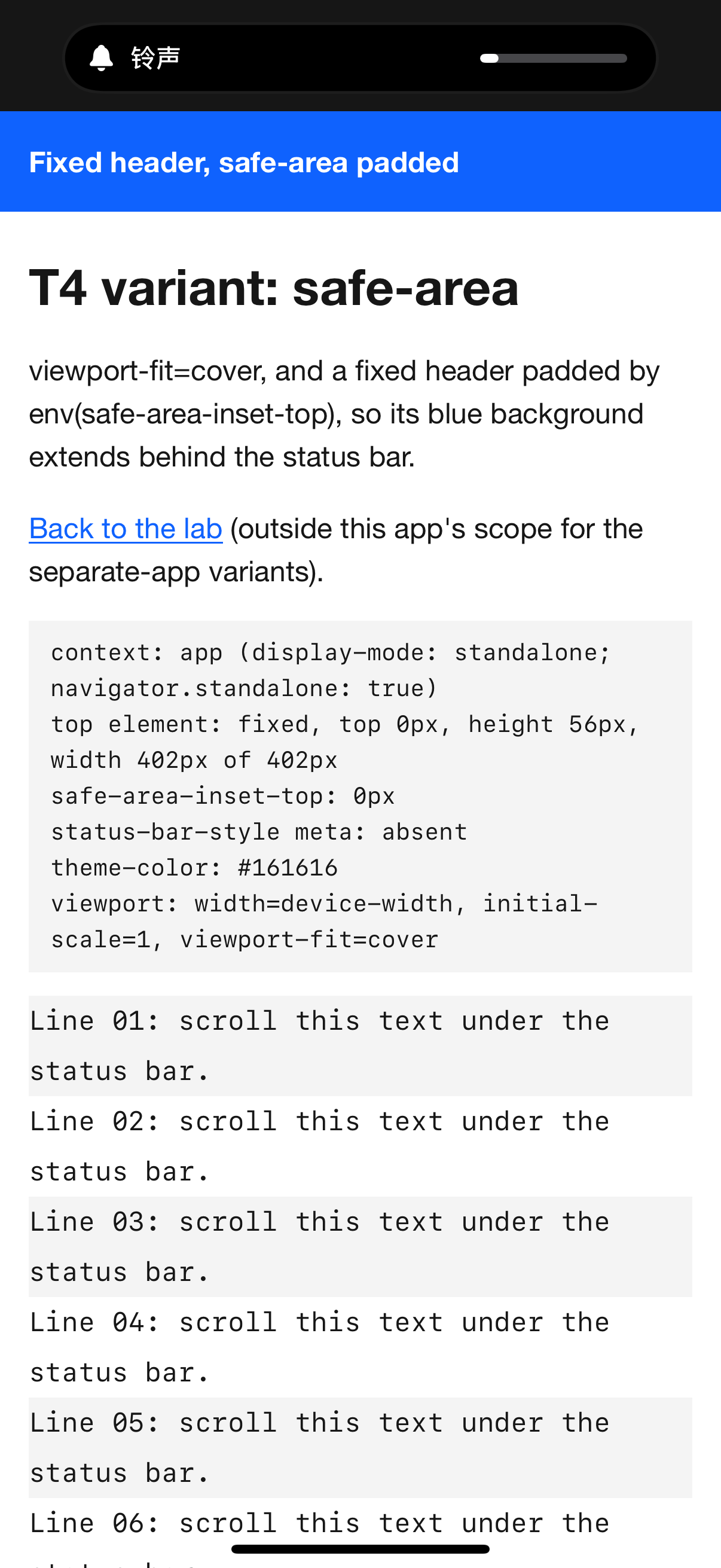
The page /lab/device-tests/t4/sbs-black-translucent/ was installed from Safari as its own app (“SBS transl”, own manifest with display: standalone). It declares apple-mobile-web-app-status-bar-style: black-translucent, the viewport width=device-width, initial-scale=1, viewport-fit=cover, a theme-color of #161616 and a static blue (#0f62fe) header 56 px high with no safe-area padding at the top of the page.
An agent read the page over USB while the app was in front (09:31:04 UTC, N55). The read captured innerWidth and innerHeight, the four safe-area insets measured with a probe element, the status-bar-style and viewport metas as parsed, the element and colour at the top of the viewport, and prefers-color-scheme. Two comparisons use the same kind of read:
- the default status-bar style (no meta) in the PWA Lab app, on the baseline, fixed, sticky and safe-area variants, where safe-area also sets
viewport-fit=cover (N25 to N29);
- the same
black-translucent page in a Safari tab (N51).
- In Safari, open
https://openpwa.net/lab/device-tests/t4/sbs-black-translucent/, then Share → Add to Home Screen → Add.
- Open “SBS transl” from its icon and keep it at the top of the page. The page prints its own probe block, but use the console read below for the insets: the printed
safe-area-inset-top can be computed before the insets apply at launch (anomaly A11 in the report).
- With Web Inspector (Mac Safari → Develop → your iPhone → the app), run:
const p = document.createElement('div'); p.style.cssText = 'position:fixed;padding:env(safe-area-inset-top) 0 env(safe-area-inset-bottom)'; document.body.append(p); [innerWidth, innerHeight, getComputedStyle(p).paddingTop, getComputedStyle(p).paddingBottom].
- Without Web Inspector, check by eye whether the blue header sits behind the time and battery, and take a screenshot.
- For the comparison, open
https://openpwa.net/lab/device-tests/ as a Home Screen app, open the safe-area variant from its T4 table and run the same console line.
- Optional: run the line in a Safari tab on the
sbs-black-translucent URL.
On iOS 18.6.2 the black-translucent app filled the screen. It returned standalone true, with inner size 402 x 874, safe-area-inset-top 62 px, right 0, bottom 34 px, left 0, with the blue header at top 0 and rgb(15, 98, 254) as the colour at the top of the viewport (A, N55). With the default style the viewport started 62 px lower, with inner height 812 of 874 and top inset 0 on every variant, and viewport-fit=cover changed only the bottom inset, to 34 px (A, N25 to N29). In a Safari tab the same black-translucent page read 402 x 678 with all insets 0 (A, N51). The confidence label is A. The operator reported the blue header behind white status-bar text (O); no screenshot of this app was delivered.
2026-10-20, iOS 18.6.2
In the SBS transl app (black-translucent with viewport-fit=cover) the viewport was the full 402 x 874 screen with a 62 px top and 34 px bottom safe-area inset, so the page is drawn under the status bar. The page's own probe text, computed earlier, printed a 0 px top inset (anomaly A11).
- Date
- 2026-10-20
- Device
- iPhone 16 Pro
- OS and build
- iOS 18.6.2 (22G100), release
- Context
- Home Screen app
- Result
- As expected
- Key values
statusBarStyle: black-translucentviewportFit: coverinnerWidth: 402innerHeight: 874safeAreaInsetTopPx: 62safeAreaInsetBottomPx: 34
- Confidence
- A, Instrumented read
- Tests
- T4b
- Notebook entries
- N55
- Study
- Read the study · Data package
- Harness
- Harness v1
Harness v1 files used (3), served SHA-256
/lab/device-tests/t4/sbs-black-translucent/ 23ae90d26998f2e5c2a1e8cbbead40181405a3620fa00d2228fea6fccde6f426/lab/device-tests/t4/sbs-black-translucent/manifest.webmanifest 08dd85589f951a32aff8f1542664a7bbeffe1455fcdcfdf07e985ecb3e01e379/lab/device-tests/icons/ati-180.png 08d9c8fa268662b4c67f5d96ffa1fa508cfd2c3f3048e550f498c02dca82e8ef
| Page |
status-bar-style |
viewport-fit |
inner size |
inset top / bottom |
Notebook |
| baseline, fixed, sticky (app) |
none |
not set |
402 x 812 |
0 / 0 |
N25, N26, N28 |
| safe-area (app) |
none |
cover |
402 x 812 |
0 / 34 |
N29 |
| SBS transl (app) |
black-translucent |
cover |
402 x 874 |
62 / 34 |
N55 |
| SBS transl (Safari tab) |
black-translucent |
cover |
402 x 678 |
0 / 0 |
N51 |
Apple’s archived meta-tag reference says the tag “has no effect unless you first specify full-screen mode”, that with default or black “the web content is displayed below the status bar”, and that with black-translucent “the web content is displayed on the entire screen, partially obscured by the status bar” (Supported Meta Tags, developer.apple.com). Firtman’s notes mark the tag as superseded by the theme-color meta since iOS 15, but keep black-translucent as “Still the only way to get a fullscreen app” (iOS PWA Compatibility, firt.dev). The insets come from the safe-area-inset-* environment variables, measured from the edges of the viewport (CSS Environment Variables, csswg.org); viewport-fit=cover sizes the viewport to the rectangle that circumscribes the screen (CSS Round Display, viewport-fit, csswg.org). This run tested black-translucent only together with viewport-fit=cover.
The instrumented read agrees with Apple’s archived text and Firtman’s note. In the app the page is drawn over the full screen and the 62 px top inset tells it where the status bar is, while the Safari tab read of the same page showed neither the full-height viewport nor any inset. The default-style reads add a detail the sources leave out: without black-translucent, viewport-fit=cover does not move the top edge. Apple’s “black and translucent” describes the bar’s look, which was not measured beyond the operator’s report. The study counts this as a confirmation with measured values, not a new finding.
From the iOS 18.6.2 data package (CC BY 4.0):
Notebook entries N25 to N29, N50-a, N51 and N55: 2026-10-ios18-baseline.md. Rows: /lab/results.json. Cite as “OpenPWA device test, 2026-10-20, iPhone 16 Pro, iOS 18.6.2 (22G100), N55”.
The result supports the statements that black-translucent with viewport-fit=cover still produces a full-height page on iOS 18, with the top inset to pad against.
- One instrumented read of the app (N55), no screenshot (T4b_1 to T4b_3 were not delivered). The white status-bar text and the header behind the time rest on the operator’s report.
- The page’s own probe block printed
safe-area-inset-top: 0px while the agent’s read at the same moment gave 62 px; innerHeight 874 supports 62 px, and the cause (the block computed before the insets applied) is unverified (anomaly A11).
default and black were not installed as separate apps, and black-translucent without viewport-fit=cover was not tested.- Portrait and Light appearance only. Scrolling content under the bar was not reported.
- One iPhone 16 Pro, one build, one operator. Claims that the tag has no effect on iOS 27 (Modern Web Weekly #80, substack.com) were not tested; this is their 18.6.2 baseline.
Device steps performed by an OpenPWA operator on an iPhone 16 Pro. AI agent sessions read page state over USB, kept the notebook and drafted this text; automated gates and an AI fact-check checked it. No person reviews each entry.