API in Service Worker
skipWaiting() and the update flow
Published
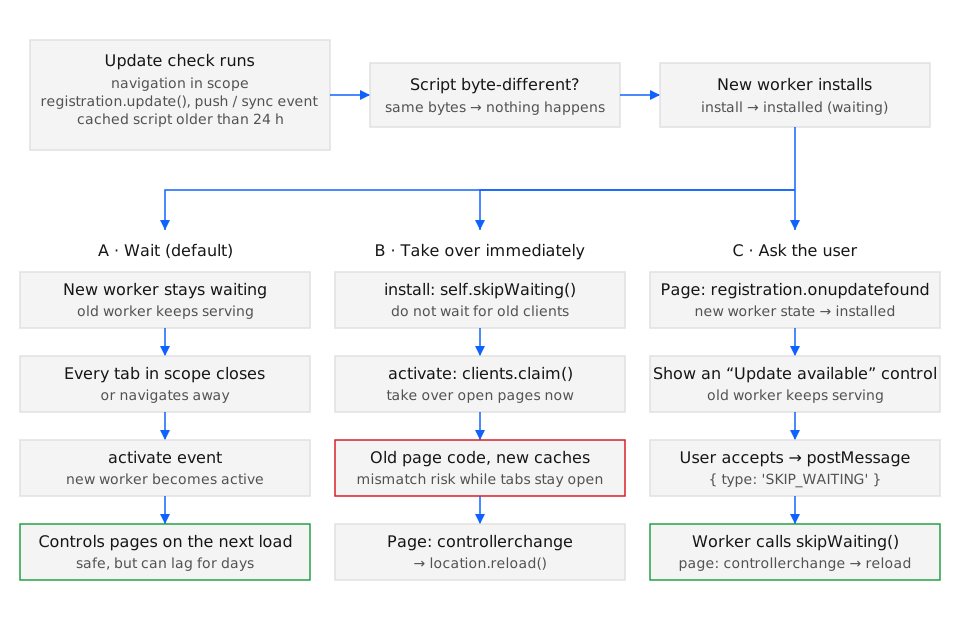
When the browser fetches a service worker script that differs by at least one byte from the installed one, it installs the new worker beside the old one and holds it in the waiting state until every page controlled by the old worker is gone; self.skipWaiting() removes that hold and clients.claim() lets the activated worker adopt pages it does not yet control. All four parts of this flow (skipWaiting(), clients.claim(), registration.update(), and the updateViaCache option) are available in Chrome 41, Firefox 44, Safari 11.1, and Edge 17 (BCD api.ServiceWorkerGlobalScope.skipWaiting), except updateViaCache, which arrived in Chrome 68, Firefox 57, and Safari 11.1.
Syntax
Section titled “Syntax”// Service workerself.skipWaiting(); // Promise<undefined>self.clients.claim(); // Promise<undefined>
// Pageconst registration = await navigator.serviceWorker.register('/sw.js', { updateViaCache: 'none' });await registration.update(); // resolves with the registrationregistration.waiting; // null when no worker is waitingregistration.addEventListener('updatefound', handler);navigator.serviceWorker.addEventListener('controllerchange', handler);The browser runs the update check on its own whenever a navigation inside the scope happens, when a push or sync event fires, and when a functional event arrives more than 24 hours after the last check; registration.update() triggers the same check on demand. A worker whose install handler rejects does not reach waiting and becomes redundant.
Parameters
Section titled “Parameters”Two of the four members take no arguments; the other two take a registration option and nothing.
| Member | Where | Argument | Effect |
|---|---|---|---|
self.skipWaiting() |
Worker | none | Marks this worker to activate as soon as the current active worker’s running events finish, instead of waiting for all its clients to close. Usually called inside install. |
self.clients.claim() |
Worker | none | Makes this active worker the controller of every in-scope client that has no controller or is controlled by an older worker; fires controllerchange in each of those pages. Only valid once the worker is active, so it belongs in activate. |
registration.update() |
Page | none | Re-fetches the script (honouring updateViaCache) and byte-compares it; resolves with the registration whether or not a new worker was found. |
updateViaCache |
register() option |
'imports' (default), 'all', or 'none' |
Which scripts the HTTP cache may serve during an update check: only importScripts() dependencies, everything, or nothing. Independently of this option, the browser ignores any cached copy older than 24 hours. |
Exceptions
Section titled “Exceptions”skipWaiting() does not reject: the specification resolves its promise with undefined once the worker is active or when it was already active. The other members can.
clients.claim()rejects withInvalidStateErrorwhen the worker is not the registration’s active worker, for example when called at the top level of the script while the worker is still installing.registration.update()rejects withTypeErrorwhen the fetched script fails to load or has a MIME type other than a JavaScript type, and withInvalidStateErrorwhen the registration has been unregistered or its newest worker isnull.register()rejects withTypeErrorwhenupdateViaCacheis not one of the three allowed strings.
Calling skipWaiting() without reloading the controlled pages leaves them running HTML from the previous deployment against a worker whose precache contains the new deployment; a page that later lazy-loads a hashed chunk that no longer exists gets a 404. The controllerchange reload in the examples closes that window.
Examples
Section titled “Examples”The three examples implement the three paths in the diagram: immediate takeover, user-prompted update, and an on-demand check.
Taking over immediately with skipWaiting(), claim(), and a guarded reload
Section titled “Taking over immediately with skipWaiting(), claim(), and a guarded reload”The worker skips waiting in install and claims clients in activate; the page reloads once on controllerchange. The refreshing flag stops a reload loop when claim() fires the event a second time.
self.addEventListener('install', (event) => {  event.waitUntil(caches.open('app-v2').then((cache) => cache.addAll(['/', '/app.js'])));  self.skipWaiting();});self.addEventListener('activate', (event) => {  event.waitUntil(self.clients.claim());});
// page.jslet refreshing = false;navigator.serviceWorker.addEventListener('controllerchange', () => {  if (refreshing) return;  refreshing = true;  location.reload();});
This path costs every open tab a reload mid-session, including one where the user is typing into a form; it suits apps whose pages are short-lived.
Asking the user before activating
Section titled “Asking the user before activating”The page watches updatefound, waits for the new worker to reach installed, and shows a control; only after the click does it message the worker, which then calls skipWaiting().
const registration = await navigator.serviceWorker.register('/sw.js');registration.addEventListener('updatefound', () => {  const worker = registration.installing;  worker.addEventListener('statechange', () => {    if (worker.state === 'installed' && navigator.serviceWorker.controller) {      showUpdateButton(() => worker.postMessage({ type: 'SKIP_WAITING' }));    }  });});navigator.serviceWorker.addEventListener('controllerchange', () => location.reload());
// sw.jsself.addEventListener('message', (event) => {  if (event.data?.type === 'SKIP_WAITING') self.skipWaiting();});
The navigator.serviceWorker.controller check skips the very first install, where there is no old version to replace. If the page is already open in a second tab, that tab also reloads on controllerchange.
Checking for an update on demand and detecting the API
Section titled “Checking for an update on demand and detecting the API”A long-lived single-page app that does not navigate would otherwise only check for updates every 24 hours. The code below checks once an hour and degrades to doing nothing where navigator.serviceWorker is absent, which is the case on an insecure (plain HTTP, non-localhost) origin in every browser that implements the API.
if ('serviceWorker' in navigator) { navigator.serviceWorker.ready.then((registration) => { setInterval(() => registration.update().catch(() => {}), 60 * 60 * 1000); });} else { // No service worker: the page always runs the deployed version, so no update check is needed.}update() rejecting while offline is expected; swallowing it here is correct because the next interval will retry.
See also
Section titled “See also”- Service Workers specification: Update algorithm (w3.org)
- Service Workers specification: skipWaiting() method (w3c.github.io)
- The service worker lifecycle (web.dev)
- Service worker lifecycle
- Service worker registration and scope
- Debugging service workers
- Workbox
Specifications
| Specification | Status |
|---|---|
| None. | |