Testing Home Screen web apps on iOS 18.6.2
Published Updated
Home Screen web apps on iOS 18.6.2 received a copied Safari cookie and handled notification clicks in a three-hour test on 2026-10-20, using one iPhone 16 Pro (build 22G100, Safari 18.6). An OpenPWA operator added and opened the test pages on the Home Screen, tapped notifications, and took screenshots. After each step, an agent read the page over USB.
The run tested eleven questions about app launch and icon selection, data carried over from Safari and the layout and colour at the top of the screen. It also checked whether notification permission and push subscriptions matched the documentation, along with notificationclick and badging. We followed up on status-bar colour that evening. Most results confirm behaviour already described by WebKit or community notes, with measurements on this build. A prior-art check found no earlier record of two results. The sanitised evidence is public under CC BY 4.0 in the data package.
Findings on 18.6.2
Section titled “Findings on 18.6.2”A page with no manifest and no icon, added to the Home Screen, opened in Safari with Safari’s storage rather than as a web app. A first-party cookie was copied from Safari into each new Home Screen app once and was independent afterwards, while localStorage and IndexedDB did not copy, which replicates on 18.6.2 what WebKit described for iOS 17.2. In the installed app, notificationclick fired through both addEventListener and the onnotificationclick property on all six taps, each time with a live window to focus. 'onnotificationclick' in self was true in the service worker controlled by the installed app and false in the same worker controlled by a Safari tab, which accounts for the “unsupported” entry in browser-compat-data (BCD). A permission request in an app with no prior permission prompt stayed pending for 2068 ms until the operator answered a visible system prompt. With a subpath-scoped service worker, window.pushManager.getSubscription() returned null while the worker’s registration held a subscription, consistent with WebKit’s rule that only a root-scoped worker shares the window’s subscription. With the default status-bar style the strip above the page was a solid colour that page content could not reach, taken from the page’s theme-color meta when the page had one and from the manifest’s theme_color otherwise; black-translucent with viewport-fit=cover drew the page under the status bar (REPORT.md, openpwa.net).
Launch context and its impact on iOS web apps
Section titled “Launch context and its impact on iOS web apps”Since iOS 16.4 a site added to the Home Screen with a manifest whose display is standalone or fullscreen opens as a web app with Web Push, notifications and the Badging API, capabilities that a Safari tab lacks (Web Push for Web Apps on iOS and iPadOS, webkit.org). The launch context changes which interfaces exist, which storage the page sees, how the top of the screen is drawn, and whether notification events reach the service worker. Testing or detecting features only in a Safari tab leaves the installed-app context unchecked.
Two disagreements between sources prompted the test. BCD records notificationclick on ServiceWorkerGlobalScope as unsupported on Safari for iOS, while a long-open BCD issue reports that the event fires in installed apps (mdn/browser-compat-data#22959, github.com). OpenPWA’s own page on Home Screen storage isolation told readers that a sign-in token written in Safari is absent in the installed app, while WebKit’s Safari 17.2 post documents that cookies are copied when the app is created (WebKit Features in Safari 17.2, webkit.org). We tested both questions on the device and corrected the storage entry from the results.
The run is also a baseline. The same phone will be upgraded to iOS 27 and the same pages re-checked, and an iOS 18.6.2 state cannot be re-measured once the phone is upgraded. A newsletter issue on iOS 27 claims that installed apps render a blur under the status bar and that theme-color and apple-mobile-web-app-status-bar-style have no effect there (So what’s up with the iOS27 blur?, modernwebweekly.substack.com); the 18.6.2 measurements provide a comparison for that claim.
What was already documented
Section titled “What was already documented”Results are labelled as confirmations of published descriptions or new findings. We checked WebKit’s release posts, BCD and its issue thread, the WebKit bugs named here and Maximiliano Firtman’s notes on PWA support in iOS, which were updated on 2026-10-13 (iOS PWA Compatibility, firt.dev).
Vendor documentation
Section titled “Vendor documentation”WebKit defines a Home Screen web app by its manifest; without a manifest or the apple-mobile-web-app-capable meta tag the site is saved as a bookmark that opens in the default browser (Web Push for Web Apps on iOS and iPadOS, webkit.org). From iOS 26 every added site opens as a web app by default unless the user turns off “Open as Web App” (WebKit Features in Safari 26.0, webkit.org), so an 18.6.2 run is a pre-26 control.
On storage, WebKit’s tracking-prevention page says that “the website data of home screen web applications is kept isolated from Safari” (Tracking Prevention in WebKit, webkit.org), and the reply on WebKit bug 181849 calls the separation “by design” (Bug 181849, bugs.webkit.org). The Safari 17.2 post refines this for cookies. When a user taps “Add to Home Screen” and creates a web app, “the cookies are copied over, including the information about login state”, “No other kind of local storage is copied over”, and “After a user adds a web app to the Home Screen or Dock, no other website data is shared” (WebKit Features in Safari 17.2, webkit.org).
Declarative Web Push, from iOS and iPadOS 18.4, adds window.pushManager so a page can subscribe without a service worker (WebKit Features in Safari 18.4, webkit.org). WebKit’s post on it adds: “If you do also have a registered service worker scoped to the root level of your website domain, it shares the same push subscription as the window object” (Meet Declarative Web Push, webkit.org).
For the top of the screen, Apple’s archived meta-tag reference says that with default or black “the web content is displayed below the status bar”, and with black-translucent “the web content is displayed on the entire screen, partially obscured by the status bar” (Supported Meta Tags, developer.apple.com). Safari 15 added theme-color, which changes “the color of the status bar and overscroll area in Safari on iOS 15” (New WebKit Features in Safari 15, webkit.org). The Web Application Manifest makes theme_color the default theme colour of an application context and lets the user agent override it with a theme-color meta element in an in-scope document; it does not require the override (Web Application Manifest, w3.org).
Compatibility data and bug reports
Section titled “Compatibility data and bug reports”BCD’s ServiceWorkerGlobalScope.json records notificationclick_event on safari_ios as version_added: false (BCD api/ServiceWorkerGlobalScope.json, github.com). On issue #22959, opened in 2024 and still open on 2026-10-20, a BCD contributor explains that the collector checks "onnotificationclick" in self in a service worker, that the check fails on Safari for iOS 16, 17 and 18, and that the property sits behind a WebKit preference; other participants report the event firing in installed apps (mdn/browser-compat-data#22959, github.com). WebKit bug 268797, “notificationclick events in serviceworkers not firing”, is open with status NEW and carries reports of the event not firing when the user taps a notification while no page of the app is alive (Bug 268797, bugs.webkit.org). BCD records api.Window.pushManager from Safari for iOS 18.4, with a note that notifications are supported in web apps saved to the Home Screen, and does not say whether the object is exposed in a tab (BCD api/Window.json, github.com).
Community notes
Section titled “Community notes”Firtman’s notes record login cookies as copied to the installed app since 17.2 and storage as not shared with the browser, say that the apple-touch-icon link element overrides the manifest icon declaration, advise against apple-mobile-web-app-status-bar-style since iOS 15 in favour of the theme-color meta tag, and keep black-translucent as “Still the only way to get a fullscreen app” (iOS PWA Compatibility, firt.dev). We tested several of those behaviours on 18.6.2.
What this test adds
Section titled “What this test adds”The cookie copy, notificationclick firing in installed apps, black-translucent as the route to a full-screen page, and the icon and manifest rules were all documented before. The test adds dated measurements on this build. Two results had no public source in our search. 'onnotificationclick' in self is true in a worker controlled by the installed app and false in the same worker controlled by a Safari tab, and window.pushManager is exposed in a plain Safari tab, where Notification and PushManager are not. The measured geometry of the default status bar on 18.x (a 62 px offset, 812 of 874 CSS px, a solid strip) was also not public, although the behaviour it measures is documented (FINDINGS.md, openpwa.net).
Method
Section titled “Method”We gave values read from the page precedence over screenshots, and screenshots precedence over verbal descriptions. The test report gives the procedure step by step, with tool hashes and the commits of the test pages (REPORT.md, openpwa.net).
Device and host
Section titled “Device and host”The device was an iPhone 16 Pro (ProductType iPhone17,1) on iOS 18.6.2, build 22G100, release channel, with Safari 18.6 and the browser language zh-CN, so system alerts appeared in Chinese. Appearance was Light, and all instrumented reads between 06:54 and 09:31 UTC reported prefers-color-scheme: dark as false. Web Inspector and Remote Automation were enabled. The phone was not wiped, carried other sites’ Home Screen apps and had at least one Safari Web Extension installed; feature flags were not recorded. Neither were VPN and iCloud Private Relay settings. The host was a Mac with macOS 26.3 connected by USB, running safaridriver and ios_webkit_debug_proxy 1.9.2 (ios-webkit-debug-proxy, github.com).
Test pages
Section titled “Test pages”All pages were served from openpwa.net. The demo app is installable, with id, start_url and scope set to /demo/, a language toggle stored in localStorage, a push page and a badging page. The device lab (under /lab/, not indexed) is a second installable app with its own manifest and service worker, plus:
- a probe page with no manifest, no icon, no theme colour and no service worker;
- a manifest-only app with manifest icons and no apple-touch-icon;
- icons that print their own source (a red “180 apple-touch” icon, a blue “192 manifest any” icon);
- status-bar variants (baseline, fixed, sticky, safe-area) that print their own geometry, and a separately installed app with
apple-mobile-web-app-status-bar-style: black-translucent; - a notification recorder whose service worker registers
notificationclicktwice, withaddEventListenerand withself.onnotificationclick, each writing its own record to IndexedDB; - a storage marker written to localStorage, IndexedDB and a cookie (
Secure,SameSite=Lax, set bydocument.cookie); - a separate app with no prior permission prompt, “Perm Test”, that times
Notification.requestPermission()withperformance.now(); - for the follow-up, three apps (M1 to M3) whose manifest
theme_colorand pagetheme-colordiffer or are missing.
In the main run the manifests all declare theme_color #161616. Apart from the probe page and one red variant, the pages all declare a theme-color meta of #161616. The lab’s service worker did not change during the run; one script changed with a deploy at about 08:28 UTC, and reads after that point record which version was loaded (notebook, openpwa.net).
Instrumentation
Section titled “Instrumentation”After each step, the agent restarted the inspector proxy, selected the foreground page by URL and process, and evaluated a read-only expression that returned JSON. The expressions recorded push endpoints as host only. They made no permission requests, subscriptions, registrations or storage writes. Home Screen apps ran in a process separate from Safari, and only foreground pages could be read. A WebDriver-driven automation window was used for tab-side values only, because each WebDriver session on iOS received an isolated, empty website-data store. Screenshots were analysed for capture time and pixel values, and a screen recording was cut into frames (REPORT.md, openpwa.net).
Expectations and evidence classes
Section titled “Expectations and evidence classes”Expectations were written before the run in a checklist prepared for the later iOS 27 run; for steps added during the run, the expectation was written into the notebook before the read. Results carry an evidence class. A means a value read by instrumentation; S means a screenshot or the recording; O means only the operator’s verbal report. When a verbal report conflicted with a record, the record won and the conflict was logged as an anomaly; corrections were appended as new notebook entries, leaving the earlier entries unchanged. Notebook entries are cited as N01 to N66 (notebook, openpwa.net).
Results
Section titled “Results”Values cite their notebook entries. The raw reads behind A values are in the data package (data package, openpwa.net).
Which items open as apps
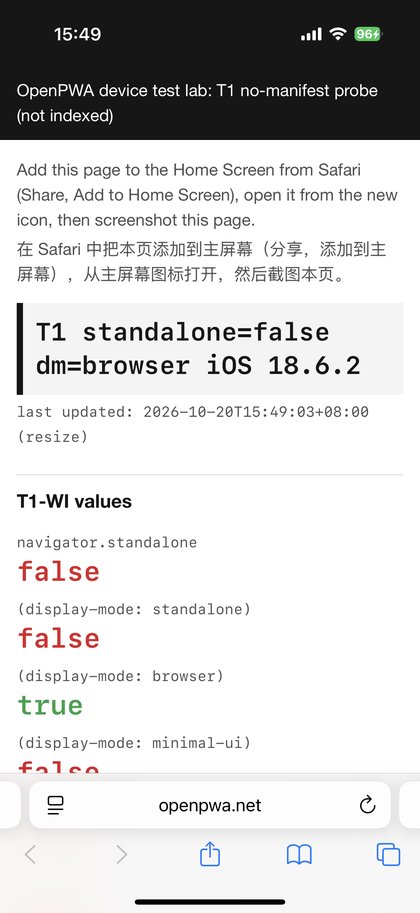
Section titled “Which items open as apps”The probe page with no manifest and no icon, launched from its own Home Screen icon, loaded in Safari’s process at the tab’s viewport size, with navigator.standalone false, display-mode: browser, Safari’s localStorage values and Safari’s service worker controlling the page (A, N23). The screenshot shows Safari’s address bar and toolbar (S, N63). The demo app, whose manifest sets display: standalone, opened standalone and matched only display-mode: standalone (A, S; N13). This matches the pre-26 rule in WebKit’s 16.4 post. The add sheet itself, captured for a page with a manifest, showed the title 添加到主屏幕, an editable name, the URL and the buttons 取消 and 添加, with no “Open as Web App” switch (S+O, N66), which fits WebKit adding that switch in iOS 26.
| Context | navigator.standalone |
display-mode | inner size (CSS px) | screen |
|---|---|---|---|---|
| Safari tab (four pages) | false | browser | 402 x 678 | 402 x 874 |
| Probe page from its icon | false | browser | 402 x 678 | 402 x 874 |
| Demo app | true | standalone | 402 x 812 | 402 x 874 |
| Lab app | true | standalone | 402 x 812 | 402 x 874 |
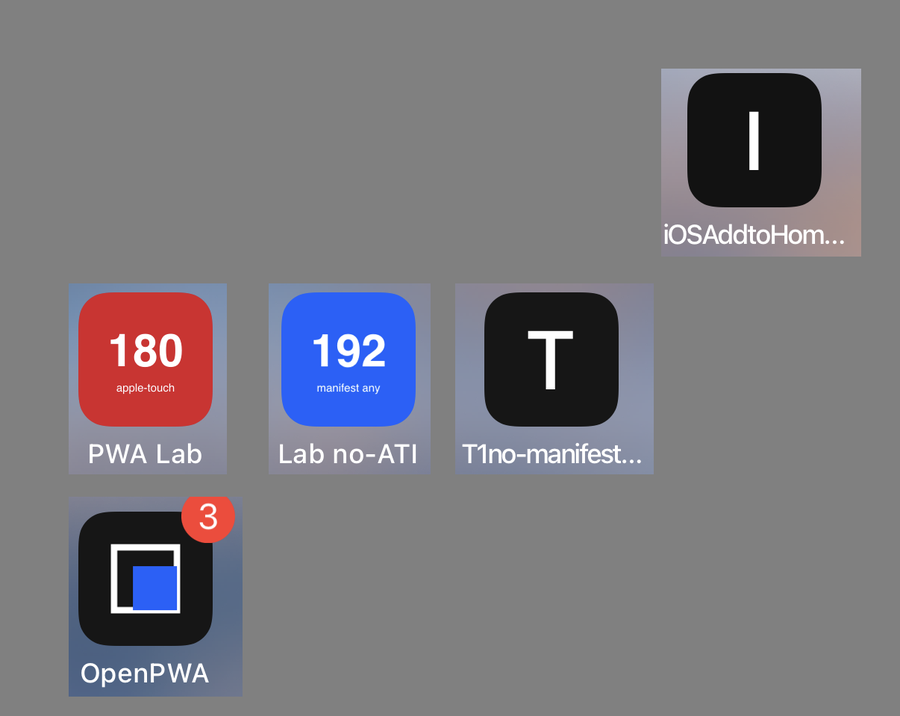
The lab app, which declares an apple-touch-icon and manifest icons, showed the red “180 apple-touch” icon. The manifest-only app showed the blue “192 manifest any” icon, not its 512 px or maskable icon. The probe page and a reference page without icons got black letter tiles (S, N63). The icon selection matches Firtman’s note that the apple-touch-icon overrides the manifest.
Storage and cookies
Section titled “Storage and cookies”The demo’s language marker in localStorage was absent in the app at first launch and did not cross in either direction afterwards (A for the reading side of each step, the other side by operator report; N13, N16, N17). The lab marker compared the three stores across Safari and two Home Screen apps (A; N18 to N22):
| Event (UTC) | localStorage | IndexedDB | cookie |
|---|---|---|---|
07:13:46 Safari writes TAB-07:13:46 |
TAB-07:13:46 | TAB-07:13:46 | TAB-07:13:46 |
| about 07:16 both lab apps added | |||
| 07:34:15 lab app, first launch | null | null | TAB-07:13:46 |
07:37:40 lab app writes APP-07:37:40 |
APP | APP | APP |
| 07:38:18 Safari reloads | TAB-07:13:46 | TAB-07:13:46 | TAB-07:13:46 |
07:45:25 Safari writes TAB-07:45:25 |
TAB-07:45:25 | TAB-07:45:25 | TAB-07:45:25 |
| 07:45:32 manifest-only app, first launch | null | null | TAB-07:13:46 |
localStorage and IndexedDB did not copy and stayed separate in both directions. The cookie was copied into each app once, and later writes on either side did not cross. Each app had its own cookie store. the manifest-only app did not see the lab app’s APP cookie, although the cookie path covered both. The manifest-only app received the value Safari held when it was added, not the one Safari wrote seven seconds before its first launch, which is consistent with a copy at Add to Home Screen. With a seven-second gap a copy at first launch from an unflushed Safari store cannot be ruled out, so the timing is rated moderate. These 18.6.2 results confirm WebKit’s Safari 17.2 description (WebKit Features in Safari 17.2, webkit.org).
The status-bar area
Section titled “The status-bar area”With the default status-bar style (no meta tag), all in-app variants had an inner height of 812 CSS px on an 874 px screen and env(safe-area-inset-top) of 0. Adding viewport-fit=cover set the bottom inset to 34 px and left the top inset at 0; the viewport still began 62 px below the top of the screen, so page content could not reach the strip, whether the header was static, fixed or sticky (A; N25 to N29).
In all 17 portrait screenshots of default-style pages, from the demo app, the lab app and Safari tabs, the strip was rgb(22, 22, 22), that is #161616, at all sample points; none were #000000. There was no blur and no content behind the time (S, N62). In a Safari tab the strip also showed #161616 when the blue header had scrolled away and the top of the page was white, so the tab tints the status-bar area with the theme-color meta rather than sampling the content, as the Safari 15 post describes (S).

The screenshotted in-app pages all declared #161616 twice, as its theme-color meta and through its manifest’s theme_color, so the main run could not tell which one set the strip. (The probe page, shown in a Safari tab, declares neither; its strip matched its own #161616 header.) A follow-up at about 10:56 UTC used three new Home Screen apps whose two colours differ, plus the lab’s red variant, and sampled six points inside the strip of each screenshot (S, N64; the operator’s description agreed on all four, O):
| App or page | manifest theme_color |
page theme-color meta |
strip |
|---|---|---|---|
| M1 | #d00000 |
#00a050 |
#00a050 |
| M2 | none | #d00000 |
#d00000 |
| M3 | #00a050 |
none | #00a050 |
| red variant inside the lab app | #161616 |
#d00000 |
#d00000 |
On iOS 18.6.2, with the default status-bar style, the strip in an installed app takes the page’s theme-color meta when the page has one, also when it differs from the manifest, and falls back to the manifest’s theme_color when the page has none. The red variant shows the colour follows the page on screen, not a value fixed when the app was added (N65). The manifest specification allows a browser to let the meta element override the manifest colour without requiring it, so this result settles on one build a choice the specification leaves open (Web Application Manifest, w3.org). It also corrects an earlier operator report that the red variant’s strip was black, which a screenshot contradicts (N65-a). We did not test a page that declares neither colour, media-qualified metas, Dark appearance, or a meta changed by script after load.

With apple-mobile-web-app-status-bar-style: black-translucent and viewport-fit=cover, in a separately installed app, the viewport filled the screen at 402 x 874, the top safe-area inset was 62 px and the bottom 34 px (A, N55); the operator reported the page’s blue header behind white status-bar text (O). This confirms Apple’s archived reference and Firtman’s note that black-translucent is still the way to a full-screen app. The default and black values were not installed as separate apps.
| Page | status-bar-style | viewport-fit |
inner height | inset top / bottom | strip |
|---|---|---|---|---|---|
| baseline, fixed, sticky | none | default | 812 | 0 / 0 | solid, page theme-color (S) |
| safe-area | none | cover | 812 | 0 / 34 | solid, page theme-color (S) |
| black-translucent app | black-translucent | cover | 874 | 62 / 34 | page drawn underneath (A) |
Notification permission
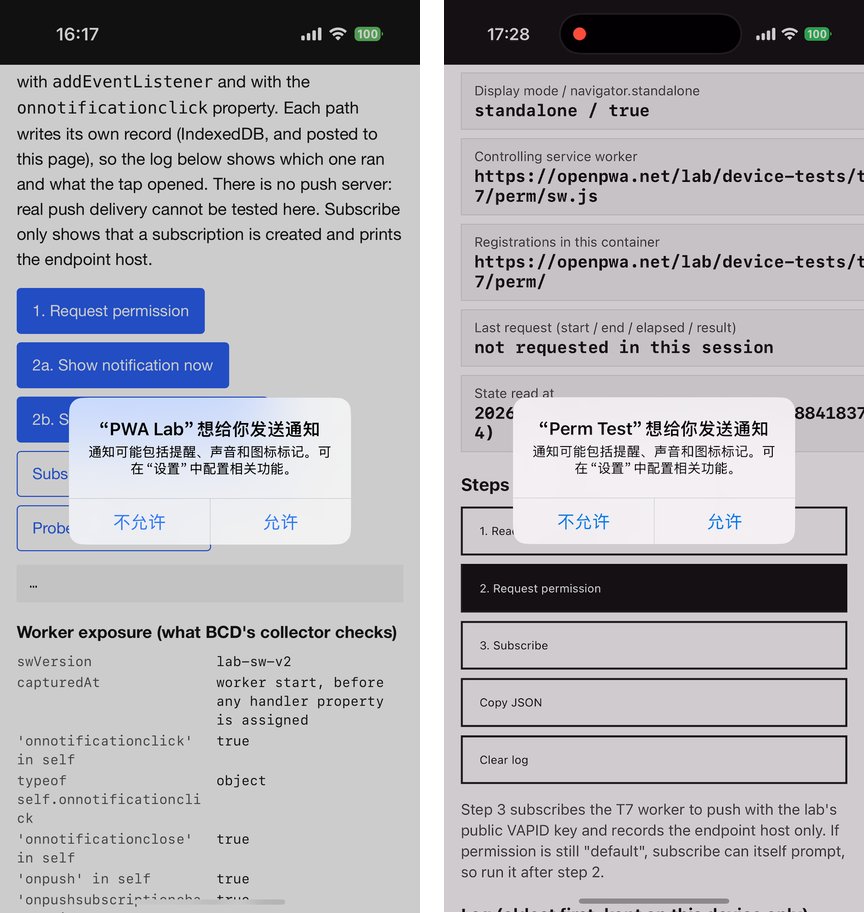
Section titled “Notification permission”In a Safari tab, Notification and PushManager were absent (A). In the lab app, Notification.permission was default at first launch and granted after the operator tapped the permission button (A; N18, N32). A screenshot taken at 08:17:36 UTC shows the system prompt with the title ““PWA Lab”想给你发送通知” and the buttons “不允许” and “允许” (S, N58). One grant set both the service-worker registration’s permissionState and window.pushManager.permissionState to granted (A).
In Perm Test, which had no prior permission prompt, recorded on screen, requestPermission() was called at 09:27:59.551 UTC and settled at 09:28:01.620 UTC, 2068 ms by performance.now(), with the result granted; the prompt is on the recording from about 70.6 s to 72.5 s, aligned with the page times within one second (A, S; N53, N54, N59). A request that resolved without user input would settle in milliseconds. The prompt followed a user gesture, confirming the 16.4 rule and adding a measured wait.
Push subscriptions
Section titled “Push subscriptions”In the lab app, a subscription through the service worker succeeded with an endpoint on web.push.apple.com, an expirationTime of null and userVisibleOnly true (A, S; N33). In the same app, window.pushManager.getSubscription() returned null, and the demo app showed the same pattern (A, N41). Both workers were scoped to a subpath, a lab path under /lab/ and /demo/, not to the root of the site. WebKit says a root-scoped worker shares the window’s subscription; these results are consistent with that rule for the non-root case, and a root-scoped worker was not tested. Separately, window.pushManager with subscribe, permissionState and getSubscription was present in a plain Safari tab, where PushManager and Notification were absent (A; N03, N10). Only the exposure was read: subscribe() was not called in the tab. We found no earlier record of this exposure in the prior-art check.
notificationclick
Section titled “notificationclick”The same worker script was read in both contexts when the worker started, before the script assigns self.onnotificationclick (A; N03, N18, N34):
| Expression | worker controlled by a Safari tab | worker controlled by the Home Screen app |
|---|---|---|
'onnotificationclick' in self |
false | true |
typeof self.onnotificationclick |
undefined | object |
'onnotificationclose' in self |
false | true |
'onpush' in self |
false | true |
'onpushsubscriptionchange' in self |
false | true |
'Notification' in self |
false | true |
'showNotification' in registration |
false | true |
'pushManager' in registration |
false | true |
typeof clients.openWindow |
function | function |
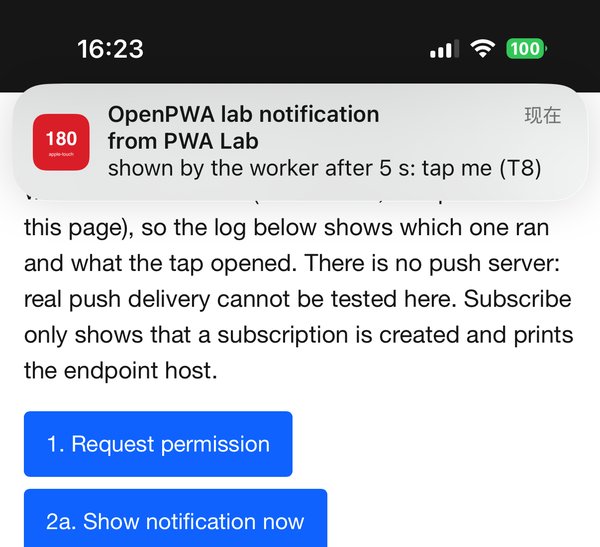
The app-side values were the same before and after permission was granted. This split is new as far as the prior-art check found, and it explains BCD’s entry: the property the collector tests is absent when a tab controls the worker. The operator then tapped six notifications shown by the worker under four conditions; every tap produced one record from each handler path (A; N35 to N40):
| Tap | Condition | Listener record | Property record | Navigation |
|---|---|---|---|---|
| 1 | banner, Home Screen | 08:23:07.007 | 08:23:07.008 | focused existing window |
| 2 | banner over the app in the foreground | 08:23:30.533 | 08:23:30.534 | focused existing window |
| 3 | banner, Home Screen | 08:24:46.071 | 08:24:46.072 | focused existing window |
| 4 | Notification Centre | 08:26:49.588 | 08:26:49.588 | focused existing window |
| 5 | after the app was swiped away and relaunched | 08:28:50.048 | 08:28:50.061 | focused existing window |
| 6 | app swiped away before the tap | 08:43:09.236 | 08:43:09.245 | focused existing window |
Both paths fired on 6 of 6 taps, clients.matchAll() found one window each time and focus() succeeded; neither handler called event.preventDefault(), and no notificationclose record appeared. In tap 6 the app had been swiped away about six seconds earlier, yet the page loaded at the previous relaunch was still alive and was focused (A, N40). The path where no window exists and the worker must call clients.openWindow() was therefore not reached, and no real push message was sent. The results confirm the developer reports on issue #22959 and add detail on the two handler styles. The no-page-alive case of WebKit bug 268797 remains untested.
Install APIs and badging
Section titled “Install APIs and badging”navigator.install, BeforeInstallPromptEvent, onbeforeinstallprompt and getInstalledRelatedApps were absent in the tab and in the app (A). After three calls that set the badge, the demo icon showed a red “3” while the demo app had notification permission (S, N60); that the badge cleared after clearAppBadge() rests on the operator’s report alone (O). This confirms the Badging API support WebKit announced for 16.4 (WebKit Features in Safari 16.4, webkit.org).
Observer and tool errors
Section titled “Observer and tool errors”Four observer errors occurred, and a record caught each one. A status-bar step was reported as an out-of-app navigation, but the page’s history length and load time showed the link had not been tapped (N24, N25). Colour reports for the “status bar” described the page’s blue header, because the term had not been defined; they were retracted and the strip was measured from pixels (N46, N62). The operator reported that no permission prompt appeared at the first request; the operator’s own screenshot shows it (N58). A one-word answer was taken to cover apps that had not been installed (N50). Tool problems included isolated WebDriver storage, an inspector page list that stayed empty for ten minutes until Web Inspector was toggled, and an HTTP-cached script after a deploy (REPORT.md, openpwa.net).
Writing code for the installed app
Section titled “Writing code for the installed app”These code implications apply to iOS 18.6.2 on the iPhone 16 Pro with the test pages used in this run.
Sign-in and storage
Section titled “Sign-in and storage”A sign-in kept in a cookie that Safari holds before the user adds the site arrives in the installed app, as the tested first-party cookie (set by script, with Secure and SameSite=Lax) did; a token in localStorage or IndexedDB does not. After creation the two cookie stores diverge, so a later sign-out in Safari would not clear the app’s copy (a sign-out itself was not tested), and two installs of the same origin diverge from each other too. A sign-in flow can use a cookie present at install time, should not expect any other storage to carry over, and has to handle the stores drifting apart. The storage isolation entry now says this, with the WebKit 17.2 source.
Notification clicks and feature detection
Section titled “Notification clicks and feature detection”On 18.6.2 a notificationclick handler in an installed app runs whether it is registered with addEventListener or assigned to self.onnotificationclick, and it can focus an existing window. Feature detection in a tab cannot see this. the worker a tab controls has no onnotificationclick, no Notification and no showNotification. A compatibility record that wants to describe the event needs a context qualifier, as BCD already has for push_event. Code should not gate its click handler on 'onnotificationclick' in self evaluated outside the installed app.
Push subscription checks
Section titled “Push subscription checks”An app whose service worker is scoped to a subpath, that subscribes through the registration and later asks window.pushManager.getSubscription(), gets null and may conclude it is not subscribed. Query the manager the subscription was made with. Because window.pushManager also exists in a Safari tab where PushManager and Notification do not, 'pushManager' in window is not a test for “push works here”.
The top of the screen
Section titled “The top of the screen”With the default style, content cannot be placed behind the status bar on this build. The layout viewport starts below it and viewport-fit=cover alone extends only the bottom edge. A header colour behind the time needs apple-mobile-web-app-status-bar-style: black-translucent together with viewport-fit=cover, at the cost of drawing white status-bar text over whatever the page puts there. The tested page had no padding from env(safe-area-inset-top) and its header still sat behind the time; the 62 px inset is the amount to pad by when content should stay clear of the time. The page can set the strip colour. On this build the theme-color meta of the page on screen wins over the manifest’s theme_color, which only applies when the page has no meta, so a page can change the strip by declaring its own colour.
Limitations
Section titled “Limitations”The results describe one iPhone 16 Pro on build 22G100; iPadOS, other models and other builds were not tested, and the phone will be upgraded. The device was not wiped, and a Safari Web Extension of unknown identity runs in Safari’s process and could affect tab-side reads. Several results rest on the operator’s reports alone (the strip colour on the white-top, green-background and dynamic variants and in Dark appearance, the view behind the time in the black-translucent app, and the clearing of the badge); they are labelled O and are not used for the conclusions. The colour-source follow-up rests on screenshots and the operator’s report, with no instrumented read of those apps. Observer errors were detected where a second record existed; undetected errors of the same kind could remain in steps without one. Reads run JavaScript in the page and add a hidden element and a temporary property, and only foreground pages could be read. The strip colour comes from screenshots that were not checked against a measured display. Only one first-party cookie set by script was tested; server-set, HttpOnly, session, partitioned and third-party cookies were not. The run took about three hours against a 60-minute plan because discriminating steps were added; each had its expectation written before the read (notebook, openpwa.net).
The next run
Section titled “The next run”The same pages, including the apps installed on 18.6.2, will be re-checked on the same phone after its upgrade to iOS 27, so each result above has a direct comparison. We will also read the colour-source apps with instrumentation and add a page that declares no colour at all. To check cookie timing, Safari will write a new value after the app is added, with at least two minutes before its first launch. For notificationclick, a read will confirm that no window is alive before the tap so that the clients.openWindow() path runs.
Related entries
Section titled “Related entries”- Home Screen web app storage isolation on iOS: what WebKit documents about storage and cookies in installed apps.
- Web Push on iOS Safari: permission, subscription and delivery rules for Home Screen web apps.
- Add to Home Screen on iOS: how a saved site becomes a web app or a bookmark.
- theme_color and background_color: the manifest colour members and the
theme-colormeta element. - Badging API:
setAppBadge()andclearAppBadge(). - PWAs on iOS by version: the dated record of each iOS release.
Open and unverified
Section titled “Open and unverified”- What the default status-bar strip shows for a page that declares neither a
theme-colormeta nor a manifesttheme_color, and whether amedia-qualified meta or a meta changed by script is honoured, was not tested. - Whether a service worker scoped to the site root shares its subscription with
window.pushManageron 18.6.2 was not tested. - Whether
window.pushManager.subscribe()works in a Safari tab, where the object is exposed, was not tested. - Whether
notificationclickfires, andclients.openWindow()succeeds, when no page of the app is alive was not reached; no real push message was sent. - Whether the cookie is copied at Add to Home Screen or at first launch is rated moderate: the last Safari write and the second app’s first launch were only seven seconds apart.
- Server-set,
HttpOnly, session, partitioned and third-party cookies were not tested. - The
defaultandblackstatus-bar styles and Dark appearance rest on no instrumented reads; for landscape in an installed app an instrumented read recorded only the viewport (750 x 402 of 874 x 402), not whether a status bar is shown or what colour the side bands are.
Data availability and citation
Section titled “Data availability and citation”The data package holds the notebook (N01 to N66), the test report, the protocol, 77 raw JSON files (43 reads and 34 metadata sidecars), the probe scripts with their recorded hashes, 28 screenshots (five redacted) and the trimmed screen recording with key frames, with SHA-256 sums for every file and a one-file zip, under CC BY 4.0. Push endpoints were recorded as host only; the README lists every change made for publication. Cite it as “OpenPWA device test, 2026-10-20, iPhone 16 Pro, iOS 18.6.2 (22G100)”, with a notebook entry for a single finding. The demo is live at /demo/; the lab pages are served under /lab/ and are not indexed.
Sources
Section titled “Sources”- OpenPWA device test data, iOS 18.6.2 (openpwa.net)
- Test report, REPORT.md (openpwa.net)
- Headline findings, FINDINGS.md (openpwa.net)
- Lab notebook, N01 to N66 (openpwa.net)
- iOS PWA Compatibility (firt.dev)
- Web Push for Web Apps on iOS and iPadOS (webkit.org)
- WebKit Features in Safari 16.4 (webkit.org)
- WebKit Features in Safari 17.2 (webkit.org)
- Meet Declarative Web Push (webkit.org)
- WebKit Features in Safari 18.4 (webkit.org)
- WebKit Features in Safari 26.0 (webkit.org)
- New WebKit Features in Safari 15 (webkit.org)
- Tracking Prevention in WebKit (webkit.org)
- Bug 181849: “Add to homescreen” apps don’t share storage with Safari (bugs.webkit.org)
- Bug 268797: notificationclick events in serviceworkers not firing (bugs.webkit.org)
- mdn/browser-compat-data#22959 (github.com)
- browser-compat-data: api/ServiceWorkerGlobalScope.json (github.com)
- browser-compat-data: api/Window.json (github.com)
- Supported Meta Tags (developer.apple.com)
- Configuring Web Applications (developer.apple.com)
- Web Application Manifest (w3.org)
- So what’s up with the iOS27 blur? (modernwebweekly.substack.com)
- ios-webkit-debug-proxy (github.com)